Ikemen GO Merged Documentation
Merged State Controller Reference
Table of Contents
- AfterImage (old)
- AfterImage (changed)
- AfterImageTime (old)
- AllPalFX (old)
- AllPalFx (changed)
- AngleAdd (old)
- AngleDraw (old)
- AngleDraw, AngleSet, AngleMul (changed)
- AngleMul (old)
- AngleSet (old)
- AppendToClipboard (old)
- AppendToClipboard, DisplayToClipboard (changed)
- AssertAnalogVector (new)
- AssertCommand (new)
- AssertInput (new)
- AssertSpecial (old)
- AssertSpecial (changed)
- AttackDist (old)
- AttackDist (changed)
- AttackMulSet (old)
- AttackMulSet (changed)
- BGPalFX (old)
- BGPalFX (changed)
- BindToParent (old)
- BindToRoot (old)
- BindToTarget (old)
- BindToTarget (changed)
- Camera [EXPERIMENTAL] (new)
- ChangeAnim (old)
- ChangeAnim (changed)
- ChangeAnim2 (old)
- ChangeAnim2 (changed)
- ChangeMovelist (new)
- ChangeState (old)
- ChangeState (changed)
- ClearClipboard (old)
- CtrlSet (old)
- DefenceMulSet (old)
- DefenceMulSet (changed)
- Depth (new)
- DestroySelf (old)
- Dialogue (new)
- DisplayToClipboard (old)
- DizzyPointsAdd (new)
- DizzyPointsSet (new)
- DizzySet (new)
- EnvColor (old)
- EnvShake (old)
- EnvShake (changed)
- Explod (old)
- Explod (changed)
- ExplodBindTime (old)
- FallEnvShake (old)
- ForceFeedback (old)
- Forcefeedback (changed)
- GameMakeAnim (old)
- GetHitVarSet (new)
- Gravity (old)
- GroundLevelOffset (new)
- GuardBreakSet (new)
- GuardPointsAdd (new)
- GuardPointsSet (new)
- Height (new)
- Helper (old)
- Helper (changed)
- HitAdd (old)
- HitBy (old)
- HitBy (changed)
- HitDef (old)
- HitDef (changed)
- HitFallDamage (old)
- HitFallSet (old)
- HitFallVel (old)
- HitOverride (old)
- HitOverride (changed)
- HitVelSet (old)
- HitVelSet (changed)
- LifeAdd (old)
- LifebarAction (new)
- LifeSet (old)
- LoadFile (new)
- MakeDust (old)
- MapAdd (new)
- MapReset (new)
- MapSet (new)
- MatchRestart (new)
- ModifyBGCtrl (new)
- ModifyBGCtrl3D (new)
- ModifyBgm (new)
- ModifyExplod (old)
- ModifyExplod (changed)
- ModifyHitDef (new)
- ModifyPlayer (new)
- ModifyProjectile (new)
- ModifyReflection (new)
- ModifyReversalDef (new)
- ModifyShadow (new)
- ModifySnd (new)
- ModifyStageBG (new)
- ModifyStageVar (new)
- ModifyText (nighty build only) (new)
- MoveHitReset (old)
- NotHitBy (old)
- NotHitBy (changed)
- Null (old)
- Offset (old)
- OverrideClsn (new)
- PalFX (old)
- PalFx (changed)
- ParentMapAdd (new)
- ParentMapSet (new)
- ParentVarAdd (old)
- ParentVarSet (old)
- Pause (old)
- PlayBgm (new)
- PlayerPush (old)
- PlayerPush (changed)
- PlaySnd (old)
- PlaySnd (changed)
- PosAdd (old)
- PosFreeze (old)
- PosSet (old)
- PowerAdd (old)
- PowerSet (old)
- PrintToConsole (new)
- Projectile (old)
- Projectile (changed)
- RedLifeAdd (new)
- RedLifeSet (new)
- RemapPal (old)
- RemapSprite (new)
- RemoveExplod (old)
- RemoveText (new)
- ReversalDef (old)
- ReversalDef (changed)
- RootMapAdd (new)
- RootMapSet (new)
- RootVarAdd (new)
- RootVarSet (new)
- RoundTimeAdd (new)
- RoundTimeSet (new)
- SaveFile (new)
- ScoreAdd (new)
- ScreenBound (old)
- ScreenBound (changed)
- SelfState (old)
- SelfState (changed)
- ShiftInput (new)
- SndPan (old)
- SprPriority (old)
- SprPriority (changed)
- StateTypeSet (old)
- StopSnd (old)
- StopSnd (changed)
- SuperPause (old)
- SuperPause (changed)
- TagIn (new)
- TagOut (new)
- TargetAdd (new)
- TargetBind (old)
- TargetBind (changed)
- TargetDizzyPointsAdd (new)
- TargetDrop (old)
- TargetFacing (old)
- TargetFacing (changed)
- TargetGuardPointsAdd (new)
- TargetLifeAdd (old)
- TargetLifeAdd (changed)
- TargetPowerAdd (old)
- TargetPowerAdd (changed)
- TargetRedLifeAdd (new)
- TargetScoreAdd (new)
- TargetState (old)
- TargetState (changed)
- TargetVelAdd (old)
- TargetVelAdd (changed)
- TargetVelSet (old)
- TargetVelSet (changed)
- TeamMapAdd (new)
- TeamMapSet (new)
- Text (new)
- Trans (old)
- Trans (changed)
- TransformClsn (new)
- TransformSprite (new)
- Turn (old)
- VarAdd (old)
- VarRandom (old)
- VarRangeSet (old)
- VarSet (old)
- VelAdd (old)
- VelMul (old)
- VelSet (old)
- VictoryQuote (old)
- Width (old)
- Zoom (changed)
About Controllers (old)
All state controllers have two optional parameters, persistent and ignorehitpause. These must be set to integer constants.
Unless otherwise specified, any other numeric state controller parameter can be specified with an arithmetic expression.
In all cases, if setting a parameter with an expression, you should be careful that the expression does not evaluate to bottom, as in this case the parameter will be set to 0.
New state controller features (new)
Both new and old state controllers can now take advantage of some global new features.
fightfx actions
All the remaining CNS parameters used to assign character actions that didn’t support the F prefix ([Statedef], ChangeState, SelfState, ChangeAnim, ChangeAnim2, Projectile) have access to loading animations from fightfx.air. The implementation is the same as in the Explod anim parameter.
Example:
[Statedef 1000]
anim = F 300
RedirectID
This feature can be utilized with all state controllers, including legacy ones. It is an optional parameter that sends the execution of the state controller to the player with the designated PlayerID. Unlike custom states, this parameter allows interfering with a player’s behavior without putting them in another player’s states.
For state controllers that normally stop state execution (ChangeState and SelfState), redirecting to an ID different from the owner will not stop the execution of the current state code.
Examples:
A poison effect that reduces life, applied without touching the opponent:
[State -2, Poison]
type = LifeAdd
trigger1 = <Is the enemy posioned? trigger
value = -1
kill = 0
RedirectID = <Enemy id here
Increasing a team leader’s map, regardless of who is running it, if leader’s map is < 10.
[State Test]
type = MapAdd
trigger1 = Player(TeamLeader), Map(SomeLeaderMap) < 10
Map = "SomeLeaderMap"
value = 1
RedirectID = Player(TeamLeader), ID
Due to limitations in how some logic must be handled, certain state controllers may not work with RedirectID. Usually because of the order the players are processed in.
TODO: list of sctrls that can’t be redirected.
State Controllers
AfterImage (old)
Enables player afterimage effects. The character’s frames are stored in a history buffer, and are displayed after a delay as afterimages.
Required parameters:
none
Optional parameters:
time = duration (int)
Specifies the number of ticks that the afterimages should be displayed for. Set to -1 to display indefinitely.
Defaults to 1.
length = no_of_frames (int)
Sets the capacity of the frame history buffer.
The history will hold up to no_of_frames of the character’s most recently saved frames.
Assuming constant values for timegap and framegap, increasing the length can increase the number and age (for lack of a better term) of afterimages displayed at one time.
The maximum length is 60, and the default is 20.
palcolor = col (int)
See below.
palinvertall = invertall (bool)
See below.
palbright = add_r, add_g, add_b (int)
See below.
palcontrast = mul_r, mul_g, mul_b (int)
See below.
palpostbright = add2_r, add2_g, add2_b (int)
These parameters determine palette effects to be applied to all afterimages.
First the color level is adjusted according to the palcolor value, then if invertall is non-zero the colors are inverted.
Afterwards, the palbright components are added to the corresponding component of the player’s palette, then each component is multiplied by the corresponding palcontrast component divided by 256, then the palpostbright components are added to the result.
The value of palcolor ranges from 0 (greyscale) to 256 (normal color).
For instance, if the red component of the character’s palette is denoted pal_r, then the red component of the afterimage palette is given by (pal_r + add_r) * mul_r / 256 + add2_r, assuming palcolor and palinvert are left at their default values.
Valid values are 0-256 for palcolor, 0-255 for palbright and palpostbright components, and any non-negative integer for palcontrast components.
The defaults are:
palcolor = 256
palinvertall = 0
palbright = 30, 30, 30
palcontrast = 120, 120, 220
palpostbright = 0, 0, 0
paladd = add_r, add_g, add_b (int)
See below.
palmul = mul_r, mul_g, mul_b (float)
These parameters specify palette effects that are applied repeatedly to successive frames in the afterimage.
In one application of these palette effects, first the paladd components are added to the afterimage palette, then the components are multiplied by the palmul multipliers.
These effects are applied zero times to the most recent afterimage frame, once to the second-newest afterimage frame, twice in succession to the third-newest afterimage frame, etc.
Valid values are 0-255 for the paladd components, and any non-negative float value for the palmul multipliers.
The defaults are:
paladd = 10, 10, 25
palmul = 0.65, 0.65, 0.75
timegap = value (int)
This parameter controls how many frames to skip between saving player frames to the history buffer for afterimage display.
The default is 1 (skip no frames). To save every third frame (for example), you would use timegap = 3.
framegap = value (int)
Every value‘th frame in the history buffer will be displayed as an afterimage.
For instance, if framegap = 4 (the default), then the first, fifth, ninth, … frames of the history buffer will be displayed as afterimages.
trans = type (string)
Specifies the transparency type for the afterimages.
Valid values for type are none for an opaque afterimage, add, add1, and sub.
Defaults to none.
Example:
none
AfterImage (changed)
palinvertblend
palinvertblend = blend_mode (int)
Inverts current blend mode if enabled so Sub becomes Add and Add becomes Sub.
For PalFx it accepts 4 values:
- 0 = Disabled (Mugen 1.0 blending behavior)
- 1 = Enabled (Mugen 1.0 blending behavior)
- -1 = Disabled (Mugen 1.1 blending behavior)
- 2 = Enabled (Mugen 1.1 blending behavior)
If character MugenVersion is 1.1 and invertall = 1 and if invertblend param is omitted, it inverts blend by default. For all other MugenVersion invertblend is 0 if omitted.
AfterImageTime (old)
Changes the duration of the player’s afterimage effects, if currently enabled. If no afterimage effects are being displayed, this controller does nothing.
Known bugs: If the timegap parameter in the originating AfterImage controller is not set at 1, using this AfterImageTime will cause the frame positions to be reset.
Required parameters:
time = new_duration (int)
Sets the new number of ticks that the afterimages will be displayed before being removed.
Alternate syntax:
value = new_duration (int)
Optional parameters:
none
Example:
none
AllPalFX (old)
Same as PalFX, except that this affects the palette of the background and lifebars as well as the palette of all characters and explods (regardless of the ownpal parameter). See the PalFX section for details on the parameters to AllPalFX.
AllPalFx (changed)
invertblend
invertblend = blend_mode (int)
Inverts current blend mode if enabled so Sub becomes Add and Add becomes Sub.
For AllPalFx it accepts 2 values:
- 0 = Disabled (Mugen 1.0 blending behavior)
- 1 = Enabled (Mugen 1.1 blending behavior)
Defaults to 0 if omitted. If 1 it inverts blending on chars “layer”.
AngleAdd (old)
Adds to the drawing rotation angle used by AngleDraw.
Required arguments:
value = add_angle (float)
add_angle should be given in degrees.
Optional arguments:
none
Example:
none
AngleDraw (old)
Draws the player (for 1 frame) rotated about his axis by the angle set by the AngleSet controller. When facing right, a positive angle means a counterclockwise rotation.
Required arguments:
none
Optional arguments:
value = angle (float)
Sets the drawing angle in degrees.
scale = xscale, yscale (float, float)
Scales the player sprite.
Notes:
Rotation/scaling does not affect the player’s collision boxes.
Example:
none
AngleDraw, AngleSet, AngleMul (changed)
xangle (nightly build only)
xangle = xangle (int)
yangle (nightly build only)
xangle = yangle (int)
AngleMul (old)
Multiplies the drawing rotation angle used by AngleDraw by the specified factor.
Required arguments:
value = angle_multiplier (float)
Multiplies the drawing angle by angle_multiplier.
Optional arguments:
none
Example:
none
AngleSet (old)
Sets the drawing rotation angle used by AngleDraw. The angle is initialized at 0.
Required arguments:
value = angle (float)
the value of angle is interpreted to be in degrees.
Optional arguments:
none
Example:
none
AppendToClipboard (old)
This is the same as DisplayToClipboard, except that message text is added on a new line, instead of overwriting whatever text is already on the clipboard. See DisplayToClipboard for a format description.
AppendToClipboard, DisplayToClipboard (changed)
Unlike Mugen, Ikemen GO can use unlimited amount of numeric arguments. Also it supports format specifiers, e.g. %0.2f (prints float value truncated to 2 digits), %v (prints the value in a default format and optimal formatting, regardless if it’s int, float or string).
AssertAnalogVector (new)
This controller allows (de)activating the player’s analog vectors without input from a joystick. Values will be clamped to [-1,1] with the exception of analog triggers which are normalized to [0,1].
Optional parameters:
leftx = vector (float)
Sets the LeftX analog vector. Defaults to 0.
lefty = vector (float)
Sets the LeftY analog vector. Defaults to 0.
rightx = vector (float)
Sets the RightX analog vector. Defaults to 0.
righty = vector (float)
Sets the RightY analog vector. Defaults to 0.
lefttrigger = vector (float)
Sets the LeftTrigger analog vector. Defaults to 0.
righttrigger = vector (float)
Sets the RightTrigger analog vector. Defaults to 0.
Example:
[State -1, AssertAnalogVector]
type = AssertAnalogVector
leftx = 0.125
lefty = -0.5
rightx = 0
righty = 0
lefttrigger = 0.75
righttrigger = 0
AssertCommand (new)
This controller allows (de)activating the player’s commands without any button presses. If the player has multiple commands with the same name, the controller will affect all of them.
Required parameters:
name = command_name (string)
String specifying the command to assert.
Optional parameters:
buffer.time = time (int)
Number of ticks during which the command will be buffered. Defaults to 1.
Examples:
[State Test]
type = AssertCommand
trigger1 = time = 10
name = "QCF_x"
buffer.time = 5
When the name parameter is set to “” (empty), a random command from all the commands the character has will be activated.
Example:
[State Test]
type = AssertCommand
trigger1 = time = 10
name = ""
AssertInput (new)
This controller allows you to assert up to three input flags simultaneously via single sctrl. Similarly to AssertSpecial, there is no limit how many times this controller is called. Each flag will be automatically “de-asserted” at every game tick, so you must assert a flag for each tick that you want it to be active. Ikemen interprets input flags the same was as if corresponding input keys were pressed.
Required parameters:
flag = flag_name (string)
String specifying the flag to assert.
Optional parameters:
flag2 = flag_name (string)
An optional flag to assert.
flag3 = flag_name (string)
Another optional flag to assert.
flag4 = flag_name (string) (nightly build only)
Another optional flag to assert.
flag5 = flag_name (string) (nightly build only)
Another optional flag to assert.
flag6 = flag_name (string) (nightly build only)
Another optional flag to assert.
flag7 = flag_name (string) (nightly build only)
Another optional flag to assert.
flag8 = flag_name (string) (nightly build only)
Another optional flag to assert.
Details:
The flag name can be one of the following input keys (case sensitive):
U, D, L, R, a, b, c, x, y, z, s, d, w, m
B, F (nightly build only)
AssertSpecial (old)
This controller allows you to assert up to three special flags simultaneously. MUGEN will automatically deassert each flag at every game tick, so you must assert a flag for each tick that you want it to be active.
Required parameters:
flag = flag_name
flag_name is a string specifying the flag to assert.
Optional parameters:
flag2 = flag2_name
An optional flag to assert.
flag3 = flag3_name
Another optional flag to assert.
Details:
The flag name can be one of the following:
intro
Tells MUGEN that the character is currently performing his intro pose. Must be asserted on every tick while the intro pose is being performed.
invisible
Turns the character invisible while asserted. Does not affect display of afterimages.
roundnotover
Tells MUGEN that the character is currently performing his win pose. Should be asserted on every tick while the win pose is being performed.
nobardisplay
Disables display of life, super bars, etc. while asserted.
noBG
Turns off the background. The screen is cleared to black.
noFG
Disables display of layer 1 of the stage (the foreground).
nostandguard
While asserted, disables standing guard for the character.
nocrouchguard
While asserted, disables crouching guard for the character.
noairguard
While asserted, disables air guard for the character.
noautoturn
While asserted, keeps the character from automatically turning to face the opponent.
nojugglecheck
While asserted, disables juggle checking. P2 can be juggled regardless of juggle points.
nokosnd
Suppresses playback of sound 11, 0 (the KO sound) for players who are knocked out. For players whose KO sound echoes, nokosnd must be asserted for 50 or more ticks after the player is KOed in order to suppress all echoes.
nokoslow
While asserted, keeps MUGEN from showing the end of the round in slow motion.
noshadow
While asserted, disables display of this player’s shadows.
globalnoshadow
Disables display of all player, helper and explod shadows.
nomusic
While asserted, pauses playback of background music.
nowalk
While asserted, the player cannot enter his walk states, even if he has control. Use to prevent run states from canceling into walking.
timerfreeze
While asserted, keeps the round timer from counting down. Useful to keep the round from timing over in the middle of a splash screen.
unguardable
While asserted, all the asserting player’s HitDefs become unblockable, i.e., their guardflags are ignored.
Example:
none
AssertSpecial (changed)
Enabled (nightly build only)
Setting this parameter to 0 will disable the specified flags instead. Defaults to 1.
Flag
AssertSpecial now allows setting up to 8 flags at a time. (nightly build only)
Example:
[State Test]
type = AssertSpecial
trigger1 = 1
flag = ...
flag2 = ...
flag3 = ...
flag4 = ...
flag5 = ...
flag6 = ...
flag7 = ...
flag8 = ...
In addition, the following flags were added or changed.
AnimateHitpause (nightly build only)
While asserted, this flag makes the player’s animation advance normally even during a hitpause.
AnimFreeze
While asserted, the player’s animation will be frozen on the current frame.
AutoGuard
While asserted, makes the player guard automatically, without need to press back direction. The player will also switch automatically between standing and crouching guard.
CameraFreeze (nightly build only)
While asserted, prevents the camera from updating, effectively freezing it in place.
DrawUnder (nightly build only)
While asserted, makes the player sprites be drawn with the same properties of Explod under parameter. That is, if the player is on layer 0, it will always be drawn behind lifebars and character shadows.
GlobalNoKo
While asserted all players won’t die from taking damage.
NoAIButtonJam (nightly build only)
While asserted, disables the random direction and button jamming of Ikemen’s default AI.
NoAICheat (nightly build only)
While asserted, makes the player’s AI unable to cheat commands, i.e. complete them without performing the respective inputs.
NoAiLevel
While asserted, makes the player AILevel and AILevelF triggers return 0.
NoAirJump
Disables the hard-coded state transitions to State 45 when Ctrl=1 && StateType=A && Command="holdup" and AirJump.Num allows
NoBrake
Disables the hard-coded state transitions to State 0 when StateNo=20 && Command!="holdfwd" && Command!="holdback"
NoComboDisplay (nightly build only)
While asserted, disables displaying combo counter by this playerno (the flag has to be asserted on team leader to disable combo counter rendering for the teamside).
NoCornerPush (nightly build only)
While asserted, the player won’t be affected by HitDef cornerpush.veloff.
NoCrouch
Disables the hard-coded state transitions to State 10 when Ctrl=1 && StateType=S && Command="holddown".
NoDestroySelf (nightly build only)
While asserted, disables destroyself sctrl.
NoDizzyPointsDamage
While asserted, player won’t be affected by a HitDef’s dizzypoints parameter.
NoFaceDisplay (nightly build only)
While asserted, disables displaying the face icon for this player.
NoFaceP2 (nightly build only)
While asserted, StateDef facep2 parameter will have no effect.
NoFastRecoverFromLieDown
Disables the hard-coded faster recover from lie down on key input mashing when StateType=L && GetHitVar(RecoverTime)>0.
NoFallCount
Disables the hard-coded FallCount increment when StateNo=5070 || StateNo=5100.
NoFallDefenceUp
Disables the hard-coded defence increase when StateNo=5070 || StateNo=5100.
NoFallHitflag (nightly build only)
While asserted, every HitDef will act as if its HitFlag has no F parameter. In other words, the player becomes unable to hit falling enemies.
NoGetUpFromLieDown
Disables the hard-coded state transitions to State 5120 when StateNo=5110 && GetHitVar(RecoverTime)=0.
NoGuardKo
While asserted player won’t die from taking chip damage.
NoGuardBarDisplay (nightly build only)
While asserted, disables displaying guardbars by this playerno.
NoGuardDamage
While asserted, player won’t be affected by HitDef damage guard_damage.
NoGuardPointsDamage
While asserted, player won’t be affected by HitDef guardpoints.
NoHardcodedKeys
Disables the hard-coded state transitions when pressing directional keys (combination of NoJump, NoAirJump, NoCrouch, NoStand, NoWalk, NoBrake, NoStandGuard, NoCrouchGuard, NoAirGuard).
NoHitDamage
While asserted, player won’t be affected by HitDef damage hit_damage.
NoInput
While asserted, makes the player ignore any player/CPU inputs.
NoIntroReset
While asserted, prevents a player from being forced to their starting position after the round number announcement.
NoJump
Disables the hard-coded state transitions to State 40 when Ctrl=1 && StateType=S && Command="holdup"
NoKo
While asserted, the player won’t die from taking damage.
If ikemenversion is not 0, the NoKO flag affects only the player that called it. Otherwise, the MUGEN behavior is replicated, and all players are affected. The new GlobalNoKo flag can be used to replicate the old MUGEN behavior.
NoKoFall (nightly build only)
While asserted, the player won’t be forced to fall when receiving a hit that depletes their remaining life. In Mugen this was hardcoded into Training mode.
NoKoVelocity
While asserted, player won’t be affected by HitDef velocity adjustments upon KO.
NoLifeBarAction (nightly build only)
While asserted, disables displaying lifebar actions by this playerno (the flag has to be asserted on team leader to disable lifebar actions rendering for the teamside).
NoLifeBarDisplay (nightly build only)
While asserted, disables displaying lifebars by this playerno.
NoMakeDust
While asserted, the player does not generate hardcoded dust effects. The MakeDust state controller will also have no effect.
NoNameDisplay (nightly build only)
While asserted, disables displaying the Name by this playerno.
NoPowerBarDisplay
While asserted, disables displaying powerbars by this playerno (with team power share option enabled and/or lifebar design with only 1 powerbar per side, the flag has to be asserted on team leader to disable powerbar rendering for whole team).
NoRedLifeDamage (nightly build only)
While asserted, player won’t be affected by HitDef redlife.
NoScore (nightly build only)
While asserted, player won’t be affected by HitDef score or the ScoreAdd / TargetScoreAdd state controllers.
NoStand
Disables the hard-coded state transitions to State 12 when StateType=C && Command!="holddown".
NoStunBarDisplay (nightly build only)
While asserted, disables displaying stunbars by this playerno.
NoTimeDisplay (nightly build only)
While asserted, disables displaying the fight screens [Time] elements.
NoTurnTarget
While asserted, keeps the opponent from automatically turning to face the player. This includes the facep2 parameter. (nightly build only)
NoWinIconDisplay (nightly build only)
While asserted, disables displaying winicons by this playerno (the flag has to be asserted on team leader to disable winicon rendering for the teamside).
PostRoundInput
While asserted, player’s inputs are not disabled post-match (RoundState>2 || RoundState=-1).
ProjTypeCollision (nightly build only)
While asserted, the player will clash with projectiles (and other players with the same flag) if their Clsn2 boxes overlap. This allows helpers to easily replicate this kind of projectile clashing.
RoundFreeze
While asserted, round related lifebar actions and internal timers are frozen (allows maintaining current roundstate).
RoundNotSkip
Disables intro and victory pose skipping via button press.
RunFirst (nightly build only)
While asserted, makes the player code be processed before that of any other players.
RunLast (nightly build only)
While asserted, makes the player code be processed after all other players.
SizePushOnly (nightly build only)
In Ikemen, like Mugen, characters will push each other when both their size boxes (width * height) and their Clsn2 boxes overlap. Asserting this flag makes it so that only the size boxes are checked, as in most fighting games.
SkipFightDisplay (nightly build only)
While asserted, the “fight” announcement on round start will be skipped.
SkipKoDisplay (nightly build only)
While asserted, the KO announcement on round end will be skipped.
SkipRoundDisplay (nightly build only)
While asserted, the round number announcement on round start will be skipped.
SkipWinDisplay (nightly build only)
While asserted, the winner announcement on round end will be skipped.
AttackDist (old)
Changes the value of the guard.dist parameter for the player’s current HitDef. The guard.dist is the x-distance from P1 in which P2 will go into a guard state if P2 is holding the direction away from P1.
The effect of guard.dist only takes effect when P1 has movetype = A.
Required parameters:
value = guard_dist (int)
New guard distance, in pixels.
Optional parameters:
none
Example:
none
AttackDist (changed)
Value (nightly build only)
The value parameter now takes a second number. This number sets the distance that a player can attack behind the enemy and still allow them to enter proximity guard.
Example:
[State Test]
type = AttackDist
trigger1 = 1
value = 100, 50
Width (nightly build only)
Works the same as Value.
Height (nightly build only)
Changes the value of the guard.dist.height parameter for the player’s current HitDef.
Example:
[State Test]
type = AttackDist
trigger1 = 1
height = 160, 0
Depth (nightly build only)
Changes the value of the guard.dist.depth parameter for the player’s current HitDef.
Example:
[State Test]
type = AttackDist
trigger1 = 1
depth = 10, 10
AttackMulSet (old)
Sets the player’s attack multiplier. All damage the player gives is scaled by this amount.
Required parameters:
value = attack_mul (float)
Specifies the desired multiplier. For instance, an attack_mul of 2
deals double damage.
Optional parameters:
none
Example:
none
AttackMulSet (changed)
Damage (nightly build only)
Sets an attack multiplier for regular damage only.
DizzyPoints (nightly build only)
Sets an attack multiplier for dizzy points only.
GuardPoints (nightly build only)
Sets an attack multiplier for guard points only.
RedLife (nightly build only)
Sets an attack multiplier for red life only.
Value
Sets the attack multiplier for all types of damage.
Example:
[State Test]
type = AttackMulSet
trigger1 = 1
Damage = 0.50
RedLife = 2.00
DizzyPoints = 0.75
GuardPoints = 0.00
BGPalFX (old)
Same as PalFX, except that this affects the palette of the background and lifebars instead of the palette of the character. See the PalFX section for details on the parameters to BGPalFX.
BGPalFX (changed)
BGPalFX now also accepts ID and index parameters. This allows it to apply PalFX to specific BG elements of the stage.
ID
The ID of the stage BG element to affect. Defaults to -1 (any).
Index
The index of the stage BG element to affect. Defaults to -1 (any).
Example:
[State Test]; Invert colors for the sixth BG element with any ID
type = BGPalFX
trigger1 = 1
ID = -1
index = 5
time = 10
invertall = 1
BindToParent (old)
If the player is a helper, binds the player to a specified position relative to its parent. If the player is not a helper, this controller does nothing.
Required parameters:
none
Optional parameters:
time = *bind_time (int)*
Specify number of ticks that this binding should be effective.
Defaults to 1.
facing = *facing_flag (int)*
If facing_flag is -1, makes the player always face the opposite direction from its parent during the binding time.
If facing_flag is 1, makes the player always face the same direction as its parent during the binding time.
If facing_flag is 0, the player will not turn regardless of what its parent does.
Defaults to 0.
pos = pos_x (float), pos_y (float)
pos_x and pos_y specify the offsets (from the parent’s axis) to bind to.
Defaults to 0, 0.
Notes:
If the player’s parent is destroyed (for example, if it is a helper, and executes DestroySelf), then the effect of BindToParent is terminated.
Example:
none
BindToRoot (old)
If the player is a helper, binds the player to a specified position relative to its root. If the player is not a helper, this controller does nothing.
Required parameters:
none
Optional parameters:
time = bind_time (int)
Specify number of ticks that this binding should be effective.
Defaults to 1.
facing = facing_flag (int)
If facing_flag is -1, makes the player always face the opposite direction from its root during the binding time.
If facing_flag is 1, makes the player always face the same direction as its root during the binding time.
If facing_flag is 0, the player will not turn regardless of what its root does.
Defaults to 0.
pos = pos_x (float), pos_y (float)
pos_x and pos_y specify the offsets (from the root’s axis) to
bind to.
Defaults to 0, 0.
Notes:
If the player’s root is disabled for any reason, then the effect of
BindToRoot is terminated.
Example:
none
BindToTarget (old)
Binds the player to a specified position relative to the specified target.
Required parameters:
none
Optional parameters:
time = bind_time (int)
Specify number of ticks that this binding should be effective.
Defaults to 1.
ID = bind_id (int)
Specifies ID number of the target to bind to.
Defaults to -1 (pick
any target).
pos = pos_x (float), pos_y (float), postype (string)
pos_x and pos_y specify the offsets (from the bind point) to bind
to. The bind point defaults to the target’s axis.
If postype is Foot, then the bind point is the target’s axis.
If postype is Mid, then the bind point is the target’s
midsection.
If postype is Head, then the bind point is the target’s head.
In the latter two cases, the bind point is determined from the
values of the head.pos and mid.pos parameters in the target’s CNS
file. The bind point is not guaranteed to match up with the
target’s head or midsection.
Example:
none
BindToTarget (changed)
PosZ (nightly build only)
posz = pos_z (float)
Specify the offset (in the z-axis) to bind to. Can be skipped, so it’s backward compatible with lines having only x,y declared.
Index (nightly build only)
The index of the target to bind to. Defaults to 0 (first one).
Camera [EXPERIMENTAL] (new)
This SCTRL is still experimental and subject to possible changes, there is no guarantee this will be supported as is in future IKEMEN Go versions.
Changes the camera position and the way players interact with screen and stage edges.
Required parameters:
view = “view_type” (string)
Specifies the type of view to implement.
Valid values are “Fighting”, “Follow” or “Free”. Fighting works like common MUGEN camera. Follow anchors the camera to a specific player/helper and follows it. Free is not bound to anything other than the own camera’s limitations.
Optional parameters:
Pos: X (float), Y (float). This should be used during Free view, as it lets a character directly control the camera position values.
FollowID: ID (int). When in Follow view and a player/helper ID is specified in this parameter, camera will start following that player/helper.
Details:
When in Free view, Screenbound and Movecamera will not influence camera or char positions. Follow view will only be influenced by Screenbound/Movecamera from the player being followed (this might change in the future).
ChangeAnim (old)
Changes the action number of the player’s animation.
Required parameters:
value = anim_no (int)
anim_no is the action number to change to.
Optional parameters:
elem = elem_no (int)
elem_no is the element number within the specified action
to start from.
Example:
none
ChangeAnim (changed)
ElemTime (nightly build only)
Specifies the exact time of an animation element to change to. Defaults to 0.
Example:
[State 1000, Anim]; Change to animation 1003, element 4, second frame
type = ChangeAnim
trigger1 = Time = 30
value = 1003
elem = 4
elemtime = 1
AnimPlayerNo (nightly build only)
This parameter lets a character use the specified animation from another character. Defaults to own playerno.
SpritePlayerNo (nightly build only)
This parameter lets a character use the specified sprites from another character. Defaults to own playerno.
ReadPlayerID
This parameter lets a character use the specified animation from another character, including their sprites.
ChangeAnim2 (old)
Like ChangeAnim, except this controller should be used if you have placed P2 in a custom state via a hit and wish to change P2’s animation to one specified in P1’s air file. For example, when making throws, use this to change P2 to a being-thrown animation.
ChangeAnim2 (changed)
ElemTime (nightly build only)
See ChangeAnim.
ReadPlayerID
This parameter lets a character use the specified animation from another character, but maintaining their own sprites.
ChangeMovelist (new)
Selects which movelist assigned in the character’s DEF file should be displayed in the Pause menu command list.
Required parameters:
none
Optional parameters:
value = movelist_index (int)
Specifies the index of the movelist to use. Defaults to 0.
The movelist files are specified in the character’s DEF file, under the [Files] group. movelist and movelist0 both refer to index 0.
Example:
[State 5900, Evil Ryu movelist]
type = ChangeMovelist
trigger1 = PalNo > 6
value = 1
ChangeState (old)
Changes the state number of the player.
Required parameters:
value = state_no (int)
state_no is the number of the state to change to.
Optional parameters:
ctrl = ctrl_flag (int)
ctrl_flag is the value to set the player’s control
flag to. 0 for no control, nonzero for control.
anim = anim_no (int)
This is the action number to switch to. If omitted,
the player’s animation will remain unchanged.
Example:
; Change to standing state, and give player control
type = ChangeState
value = 0
ctrl = 1
ChangeState (changed)
Continue (nightly build only)
Due to the way State -1 is normally used to read inputs and change states, Mugen had it so that using a ChangeState in a negative state would stop the execution of the rest of the code in that state. Setting Continue to 1 will disable this behavior.
When a ChangeState is redirected, Continue will default to 1.
ClearClipboard (old)
Erases any text currently on the player’s clipboard.
Required parameters:
none
Optional parameters:
none
Example:
none
CtrlSet (old)
Sets the player’s control flag.
Required parameters:
value = ctrl_flag (int)
Set to nonzero to have control, or 0 to disable control.
Optional parameters:
none
Example:
none
DefenceMulSet (old)
Sets the player’s defense multiplier. All damage the player takes is scaled by this amount.
Required parameters:
value = defense_mul (float)
Specifies the defense multiplier.
Optional parameters:
none
Notes:
The LifeAdd controller is not affected by the player’s defense multiplier.
Example:
; All damage the player takes is reduced to half.
type = DefenceMulSet
value = 0.5
DefenceMulSet (changed)
In Mugen, DefenceMulSet changes the player’s final defense multiplier. That means it will override any defense buffs such as those gained through the fall.defence_up constant or the SuperPause p2defmul parameter. In Ikemen GO, it is only another multiplier, meaning the other defense buffs will still work correctly.
IkemenVersion
Characters with ikemenversion will have DefenceMulSet work correctly and more intuitively by default. See MulType and OnHit.
MulType
multype = bvalue (boolean int)
Defines how damage taken should be multiplied.
If 0, damage taken is multiplied by value.
If 1, defense is multiplied by value (therefore the damage is divided).
Defaults to 1 for characters with ikemenversion, and to 0 otherwise.
OnHit
onHit = bvalue (boolean int)
Defines if the defense value should also apply outside of moveType = H.
If 0, the defense value works without delay.
If 1, the defense value is only active if the char is already in moveType = H.
Defaults to 0 for characters with ikemenversion, and 1 otherwise.
Example:
[State -2, Evil Ryu Defense]
type = defencemulset
trigger1 = map(evilryu) != 0
value = 0.80
onhit = 0
multype = 1
ignorehitpause = 1
Depth (new)
Temporarily changes the depth size of the player’s for 1 frame. Similar to Width in function.
Required parameters:
none
Optional parameters:
edge = edgedepth_front, edgedepth_back (int, int)
Sets the player’s edge depth in front and behind. Edge depth determines how close the player can get to the topbound and botbound of the screen. These parameters default to 0,0 if omitted.
player = playdepth_front, playdepth_back (int, int)
Sets the player depth in front and behind. Player depth determines how close the player can get to other players depth and also determines the hitable depth area of a player. These parameters default to 0,0 if omitted
Alternate syntax:
value = value = depth_front, depth_back (int, int)
This is a shorthand syntax for setting both edge depth and player depth simultaneously. This may only be used if the edge and player parameters are not specified.
Example:
[State Test]
type = Depth
trigger1 = P2StateType = A
value = 0, 0
player = 40, 0
edge = 0, 0
DestroySelf (old)
If called by a helper-type character, DestroySelf causes that character to be removed from the field of play. DestroySelf is not valid for non-helper characters.
Required parameters:
none
Optional parameters:
recursive = recursive_flag (int)
If 1, all helper descendents of this helper will also be destroyed.
Defaults to 0.
removeexplods = remove_explods (int)
If 1, all explods belonging to the helper will also be removed.
If recursive_flag is 1, explods belonging to descendents of the helper
will also be removed.
Defaults to 0.
Notes:
Any players or explods bound to the helper will be forcefully unbound when DestroySelf
is executed.
Any unremoved explods belonging to a destroyed helper will become orphaned.
Example:
none
Dialogue (new)
Assigns dialogue data to be displayed either right before the lifebar calls the fight during first round (last frame of RoundState = 1) or at the last active frame of the final round (RoundState = 4, right before screen starts fading out). If more than 1 player calls this sctrl, who will end up initiating dialogue is chosen randomly.
Required parameters:
textX = “dialogue_info” (string)
String containing information needed for displaying dialogue. There can be multiple text parameters assigned, each suffixed with numbers in ascending order. The parameter stores both text, as well as optional tokens (enclosed in <> brackets) for controlling other aspects of dialogue (listed below).
Optional parameters:
hidebars = bars_flag (int)
Set to nonzero to hide lifebars as soon as the sctrl is called (by default lifebar is hidden only when actual dialogue starts).
force = force_flag (int)
Set to nonzero to force dialogue start immediately, ignoring normal rules.
How the rendered dialogue will look like (positioning, default face sprites, background definition, default time between text etc.) is controlled by [Dialogue Info] screenpack parameters (refer to system.def distributed with engine for a working example). By default player who called the state controller will use screenpack parameters prefixed with p1 and his enemy(0) will be assigned to use p2 parameters (this is adjustable via text tokens).
With appropriate screenpack parameters it’s possible to skip to the next text parameter during dialogue via button press, without ending it all together. If this screenpack group is missing, dialogue won’t be initiated at all (enabled parameter defaults to 0).
Optional text tokens
Tokens prefixed with pX (where X is 1 or 2) refers to screenpack [Dialogue Info] parameters prefixed the same way. Some tokens accepts redirection argument that points to which player assets (sprite, sound, anim, state) should be used.
Following redirection are supported:
self: redirects to player that called the sctrlplayerno(X): redirects to playerno Xenemy(X): redirects to enemy X of the player that called the sctrl (defaults to 0, the first enemy, if bracket is ommiteed)partner(X): redirects to partner X of the player that called the sctrl (defaults to 0, the first partner, if bracket is ommiteed)enemyname(name): redirects to the enemy with matching name (the internalnameparameter specified in .DEF file)partnername(name): redirects to the partner with matching name (the internalnameparameter specified in .DEF file)
Token list:
<pX>: changes which dialogue box side (replace X with 1 or 2) should be used to render text. Defaults to p1 side.<pXname=name>: changes pX side name displayed during dialogue to the string within quotation marks<pXname=redirection>: changes pX side name displayed during dialogue to the redirected player displayname (as specified in displayname parameter within the .DEF file)<pXface=redirection,group_or_anim,sprite_no>: changes pX side sprite group and index used to render the face portrait. If only one value is assigned, it is treated as an animation to play while the portrait is active. Defaults to the sprite numbers defined by the screenpack (and falls back to those if the specified sprites are missing), unless group_or_anim is set to -1, in which case face rendering is completely disabled.<sound=redirection,group_no,sound_no,volumescale>: plays back a sound. volumescale argument is optional (defaults to 100).- ``: changes the action number of the player’s animation
<state=redirection,state_no>: changes the state number of the player<map=redirection,map_name,value,map_type>: modifies player’s map. map_type controls what kind of operation on map should be performed (set: equivalent of MapSet,add: equivalent of MapAdd),<displayname=redirection>: part of the dialogue text replaced automatically with redirected player displayname (as specified in displayname parameter within the .DEF file)<wait=ticks>: amount of ticks delay before sctrl resume further text parameter parsing
As an example, below code showcases Symphony of the Night (in)famous cutscene recreated with Dialogue sctrl, using various advanced tokens (keep in mind that in most cases, when you don’t have to switch face sprites, play voiceovers or adjust timings, the only commonly used text token is <pX>)
Click on the image to watch the video corresponding to below code.
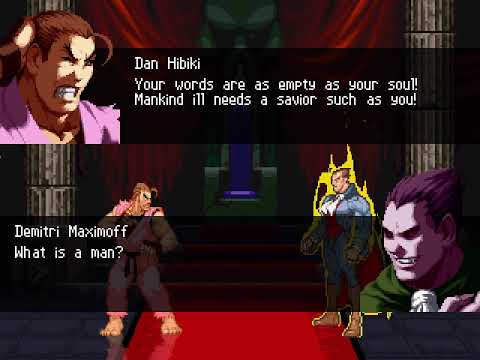
Example:
[State 191, Dialogue]
type = Dialogue
trigger1 = enemy,Name="Demitri Maximoff"
hidebars = 1
text1 = "<p1><p1face=self,9100,0><p2face=enemy,9100,4><sound=self,9100,0>Die monster.<wait=60> You don't belong in this world!"
text2 = "<p2><sound=enemy,9100,0>It was not by my hand that I am once again given flesh.<wait=120> I was called here by humans, who wish to pay me tribute.<wait=170>"
text3 = "<p1><p1face=self,9100,1><sound=self,9100,1>Tribute!?!<wait=30> You steal men's souls, and make them your slaves!<wait=90>"
text4 = "<p2><p2face=enemy,9100,2><sound=enemy,9100,1>Perhaps the same could be said of all religions...<wait=30>"
text5 = "<p1><p1face=self,9100,7><sound=self,9100,2>Your words are as empty as your soul!<wait=80><p1face=self,9100,4> Mankind ill needs a savior such as you!<wait=70>"
text6 = "<p2><p2face=enemy,9100,5><sound=enemy,9100,2>What is a man?<wait=75><p1face=self,9100,2> A miserable little pile of secrets!<wait=75> But enough talk...<wait=30> Have at you!"

[State 180, Dialogue]
type = Dialogue
trigger1 = Win && enemy,Name="Demitri Maximoff"
text1 = "<p2><p1face=self,9100,6><p2face=enemy,9100,3><sound=enemy,9200,0><state=enemy,5500>How?<wait=120> How is that I have been so defeated?<wait=120>"
text2 = "<p1><p1face=self,9100,3><sound=self,9200,0><displayname=enemy>, you have been doomed ever since you lost the ability to love.<wait=20>"
text3 = "<p2><p2face=enemy,9100,0><sound=enemy,9200,1>Ah...<wait=90> sarcasm.<p1face=self,9100,5><wait=40><state=self,186>"
DisplayToClipboard (old)
This controller is only useful for debugging. DisplayToClipboard clears the player clipboard and prints a specified message to it. Display of the player clipboards is enabled in debug mode (press Ctrl+D).
Required parameters:
text = *format_string*
format_string must be encased in double-quotes. It is a printf
format string, so if you know about printf, you can skip this
description. The format string contains any text you wish to
display. You can also use \n to generate a line break, and \t to
generate a tab character (tab width is equivalent to 4 characters).
To display the value of an arithmetic expression, you can put a %d
(for ints) or a %f (for floats) in the format string, then specify
the expression in the params list. To display a % character, you
must put %% in the format string.
Only signed integer and floating-point format specifiers are accepted:
%d, %i, %f, %F, %e, %E, %g, or %G. Length-modified format specifiers
(e.g., %lld) are not supported.
Recognized escape sequences are \n, \t, \, and `.
Optional parameters:
params = exp_1, exp_2, exp_3, exp_4, exp_5, exp_6
Up to 6 numeric arguments can be specified in the format string.
These should be listed under the params item, in order. The type
of each parameter must match its format specifier. You cannot
specify more or less parameters than are called for in the format
string.
If there is a type mismatch between the format specifier and the
parameter actually provided, then the actual value of the parameter
will be shown in an appropriate form for that type, using default
formatting options.
Example:
type = DisplayToClipboard
text=`The value of var(17) is %d, which is %f%% of 23.\n\t--Kiwi.`
params = var(17):=1,var(17)/.230

displays the following to the player's clipboard:

The value of var(17) is 1, which is 4.347826% of 23.
    --Kiwi.
DizzyPointsAdd (new)
Adds the specified amount to the player’s dizzy points.
Required parameters:
value = add_amt (int)
add_amt is the number to add to the player’s dizzy points.
DizzyPointsSet (new)
Sets the amount of dizzy points that the player has.
Required parameters:
value = set_amt (int)
set_amt is the new value to set the player’s dizzy points to.
DizzySet (new)
Sets the player’s Dizzy flag. For the duration that this flag is set, combo hit counter does not reset and the combo count lifebar text will stay on screen.
Required parameters:
value = dizzy_flag (int)
Set to nonzero to add Dizzy flag, or 0 to remove it.
EnvColor (old)
Turns the whole screen a solid color, excepting foreground-layer animations like hit sparks and ontop explods. Foreground layers of the stage will not be visible.
Required parameters:
none
Optional parameters:
value = col_r, col_g, col_b (int)
Specifies the R, G, and B components of the color to set the
screen to. Each component should be an integer between 0 and 255.
The larger a component, the more of that color will appear in the
environment color. The default is 255,255,255 (pure white).
time = effective_time (int)
Specifies how many ticks the environment color should be
displayed.
Defaults to 1 tick. Set to -1 to have the EnvColor
persist indefinitely.
under = under_flag (int)
Set under_flag to 1 to have the environment color drawn under
characters and projectiles. In other words, characters and
projectiles will be visible on top of the colored backdrop.
Defaults to 0.
Example:
none
EnvShake (old)
Causes the screen to shake vertically.
Required parameters:
time = shake_time (int)
Specifies the number of ticks to shake the screen for.
Optional parameters:
freq = shake_speed (float)
shake_speed is a float between 0 (slow shake) to 180 (fast
shake).
Defaults to 60.
ampl = shake_amplitude (int)
The larger the amplitude, the farther the screen shakes up and
down. A negative amplitude means that the screen will shake down
first.
Defaults to -4 in 240p, -8 in 480p, -16 in 720p.
phase = phase_offset (float)
Specifies the phase offset for the shaking. The default is 0,
unless the frequency multiplier is 90 or greater. In this case,
the default phase offset is 90.
Example:
none
EnvShake (changed)
Decay (nightly build only)
decay = exponent (float)
Applies an exponential decay to the shake amplitude over time, making it fade out automatically.
decay = 0: no fading0 < decay < 1: fades slow, then fastdecay = 1: fades linearlydecay > 1: fades fast, then slow
Example:
[State Shake]
type = envshake
trigger1 = !time
time = 30
ampl = 10
freq = 90
decay = 1.5
Dir (nightly build only)
dir = angle (int)
Changes the direction in degrees in which the shake is applied. Defaults to 0. For a negative amplitude, 90 will make the screen shake from left to right.
DirAdd (nightly build only)
diradd = angle (int)
Increases the shaking angle by the specified value each frame. Allows the effect to appear more exaggerated and erratic.
Mul
mul = factor (float)
For every EnvShake cycle, the amplitude is multiplied by this value. Defaults to 1. Cycle duration is determined by frequency, with a frequency of 180 needing two frames to complete one cycle.
Example:
[State 3051, Shake]
type = envshake
trigger1 = !time
time = 30
ampl = 5
freq = 180
mul = 0.9
In this case, the screen shakes 5 pixels in the first cycle, then 4.50 pixels, then 4.05 and so on.
Note: This parameter has been superseded by the decay parameter.
Explod (old)
The Explod controller is a flexible tool for displaying animations such as sparks, dust and other visual effects. Its functionality includes that of GameMakeAnim, which is now deprecated.
Required parameters:
anim = [F]anim_no (int)
anim_no specifies the number of the animation to play back.
The ‘F’ prefix is optional: if included, then the animation is played back from fightfx.air.
Optional parameters:
ID = id_no (int)
id_no specifies an ID number for this explod.
Used to identify particular explods in triggers and controllers that affect explods.
space = space (string)
Specifies the coordinate space in which the explod is to be created.
Valid values for space are:
screen
This coordinate space maps to the screen.
The upper-left corner is 0, 0 and the lower-right corner is ScreenWidth, ScreenHeight (refer to the triggers with these names).
Explods created in screen space are not affected by camera movement or zoom.
stage
This coordinate space maps to the stage space in which players reside.
0, 0 is the center of the stage at ground level.
Explods created in screen space are affected by camera movement and zoom.
This is the default.
pos = off_x, off_y (float, float)
If the explod is not bound, off_x and off_y specify the position at which to create the explod.
If the explod is bound, off_x and off_y specify the offset from the object to which the explod is bound to.
facing = facing (int)
Set facing to 1 to have the explod face in the same direction as the positive off_x, and -1 to have the explod face in the opposite direction.
Defaults to 1.
vfacing = vfacing (int)
Set vfacing to -1 to have the explod display vertically flipped, or 1 to have the explod display vertically unflipped.
Defaults to 1.
bindID = bind_id (int)
ID number of a player or helper to bind to.
The position of a bound explod is relative to the object that it is bound to.
Special values are -1 (bind to any single player) and -2 (do not bind).
Defaults to -2. The bindtime parameter is required if bindID is not -2.
Screen space explods cannot be bound.
bindtime = bind_time (int)
Specifies the number of game ticks to keep the explod bound.
After the bindtime has expired, the explod will be explod will no longer be bound to the bind point, and will maintain its position (unless affected by the vel or accel parameters).
If bind_time is -1, then the explod will be bound until the explod is removed or another controller affects the bindtime.
vel = x_vel, y_vel (float, float)
Specifies initial X and Y velocity components for the explod.
These are interpreted relative to the explod’s facing direction.
These default to 0 if omitted.
accel = x_accel, y_accel (float, float)
Specifies X and Y acceleration components for the explod. These default to 0.
removetime = rem_time (int)
If rem_time is positive, the explod will be removed after having been displayed for that number of game ticks.
If rem_time is -1, the explod will be displayed indefinitely.
If rem_time is -2, the explod will be removed when its animtime reaches 0.
The default value is -2.
supermovetime = move_time (int)
Specifies the number of ticks that the explod will be unfrozen during a SuperPause.
Used where you want the explod to be animated during a SuperPause, such as for custom super sparks.
Defaults to 0.
pausemovetime = move_time (int)
Specifies the number of ticks that the explod should be unfrozen during a Pause.
Defaults to 0.
scale = x_scale, y_scale (float, float)
x_scale and y_scale specify the scaling factors to apply to the explod in the horizontal and vertical directions.
Both default to 1 (no scaling) if omitted.
angle = angle (float)
angle specifies the explod’s drawing angle in degrees.
Defaults to 0.
yangle = y_angle (float)
y_angle specifies the explod’s drawing angle around the y-axis in degrees.
Defaults to 0.
xangle = x_angle (float)
x_angle specifies the explod’s drawing angle around the x-axis in degrees.
Defaults to 0.
sprpriority = pr (int)
pr specifies the drawing priority for the explod.
Animations with higher priority get drawn over animations with lesser priority.
For instance, setting sprpriority = -3 will cause the explod to be drawn under most characters and other explods, which usually have sprpriority >= -2.
Defaults to 0 if omitted.
ontop = bvalue (boolean)
Set ontop = 1 to have the explod drawn over all other sprites and background layers.
This parameter has precedence over sprpriority.
Defaults to 0.
shadow = shadow (int)
If shadow is not 0, a shadow will be drawn for the explod, else no shadow will be drawn.
Defaults to 0.
ownpal = ownpal_flag (int)
If ownpal_flag is 0, the explod color will be affected by subsequent execution of the player’s PalFX and RemapPal controllers.
This is normally the default.
If ownpal_flag is 1, the explod color will not be affected by subsequent execution of the player’s PalFX and RemapPal controllers.
This is the default if the anim is from fightfx.air.
remappal = dst_pal_grp, dst_pal_item (int, int)
Forces a palette remap of the explod’s indexed-color sprites to the specified palette.
This parameter is used only if ownpal_flag is non-zero and a fight.def anim is not used.
If dst_pal_grp is -1, this parameter will be ignored.
Defaults to -1, 0.
removeongethit = bvalue (boolean)
Setting this to 1 will cause the explod removed if the player gets hit.
Defaults to 0.
ignorehitpause = bvalue (boolean)
If this is 1, the explod will be animated independently of the player that created it. If set to 0, it will not be updated when the player is in hitpause.
Defaults to 1.
trans = trans_type (string)
Overrides the explod’s animation transparency settings. See the Trans controller for details. An alpha parameter may be specified if trans_type is an additive type. If omitted, does nothing.
Deprecated parameters:
postype = postype_string (string)
postype_string specifies how to interpret the pos parameters.
In all cases, a positive off_y means a downward displacement.
Valid values for postype_string are the following:
p1
Interprets pos relative to p1’s axis. A positive off_x is toward the front of p1.
This is the default value for postype for characters with a mugenversion of 1.0 or less.
p2
Interprets pos relative to p2’s axis. A positive off_x is toward the front of p2.
front
Interprets off_x relative to the edge of the screen that p1 is facing toward, and off_y relative to the top of the screen.
A positive off_x is to the right of the screen, whereas a negative off_x is toward the left.
back
Interprets off_x relative to the edge of the screen that p1 is facing away from, and off_y relative to the top of the screen.
A positive off_x is toward the center of the screen, whereas a negative off_x is away from the center.
For historical reasons, the offset behavior is inconsistent with postype = front.
left
Interprets off_x and off_y relative to the upper-left corner of the screen.
A positive off_x is toward the right of the screen.
right
Interprets off_x and off_y relative to the upper-right corner of the screen.
A positive off_x is toward the right of the screen.
none
Interprets off_x and off_y as an absolute position.
This is the default value for postype for characters with a mugenversion of 1.1 or higher.
The use of p1 or p2 postype will create an explod in stage space.
The use of front, back, left or right postype will create an explod in screen space.
The postype parameter has been deprecated in 1.1, with its functionality replaced by a combination of the space and bindID parameters, as well as the ScreenWidth, ScreenHeight, and various Edge triggers.
In 1.1, the equivalent parameters that replace postype are:
postype = p1
space = stage
pos = Pos X + CameraPos X, Pos Y
facing = facing
postype = p2
space = stage
pos = (enemynear, Pos X) + CameraPos X, (enemynear, Pos Y)
facing = enemynear, facing
postype = front
space = screen
pos = ifelse(facing = -1, 0, ScreenWidth), 0
facing = 1
postype = back
space = screen
pos = ifelse(facing = 1, 0, ScreenWidth), 0
facing = facing
postype = left
space = screen
pos = 0, 0
facing = 1
postype = right
space = screen
pos = ScreenWidth, 0
facing = 1
random = rand_x, rand_y (int, int)
Causes the explod’s bind point to be displaced by a random amount when created.
rand_x specifies the displacement range in the x direction, and rand_y specifies the displacement range in the y direction.
For instance, if pos = 0, 0 and random = 40,80, then the explod’s x location will be a random number between -20 and 19, and its y location will be a random number between -40 and 39.
Both arg1 and arg2 default to 0 if omitted.
supermove = bvalue (boolean)
This parameter is deprecated; use supermovetime parameter instead.
Set supermove = 1 to have the explod persist until the end of a super pause, regardless of the value of removetime.
Defaults to 0.
Notes:
The position of an explod that is bound to a player is determined only after all player updates have completed (compared to helpers, which are created relative to the player’s immediate position when the controller was executed).
This behavior is necessary to make explods bind properly to the player’s screen position.
For example, assume the player has an x velocity of 5 and a position of (160, 0). If an explod is created with an offset of 0, 0 relative to p1, then the explod’s actual screen position will be 165,0.
Explod (changed)
AfterImage (nightly build only)
Explods now support AfterImage parameters (e.g. afterimage.time, afterimage.length, afterimage.trans). Usage is identical to Projectile’s AfterImage.
AnimElem
animelem = elem_no (int)
Sets the element where the explod’s animation should start. Defaults to 1.
AnimPlayerNo (nightly build only)
animplayerno = playerno (int)
This parameter lets a explod use the specified animation from another character. Defaults to own playerno.
HideWithBars (nightly build only)
hidewithbars = bvalue (boolean int)
This parameter hides the explod automatically when the fight screen is hidden. Defaults to 0.
SpritePlayerNo (nightly build only)
spriteplayerno = playerno (int)
This parameter lets a explod use the specified sprites from another character. Defaults to own playerno.
AnimElemTime (nightly build only)
animelemtime = time (int)
Sets the time at which the explod’s animation element should start. Defaults to 0.
AnimFreeze
animfreeze = bvalue (boolean int)
Freezes the explod’s animation. Defaults to 0.
Example:
[State 0, Custom Afterimage]
type = Explod
trigger1 = time%5=0
anim = anim
animelem = animelemno(0)
animfreeze = 1
ID = 1000
postype = none
pos = pos x+camerapos x,pos y
facing = 1
vfacing = 1
bindtime = 1
supermovetime = 0
pausemovetime = 0
scale = 1,1
sprpriority = 10
ontop = 0
shadow = 0,0,0
ownpal = 1
trans = add
removetime = 40
palfx.time = 40
palfx.sinmul = -255,-255,-255,160
removeongethit = 0
ignorehitpause = 1
FocalLength
Focal Length of the projection. Does nothing when projection is not perspective or perspective2.
This value is fixed in Mugen 1.1, the explods will look differently under different different resolution/loaclcoord/camera zoom.
In Ikemen, this value scales internally like xy scales so that the explods will always look the same.
Default value is 2048.
Friction (nightly build only)
Applies friction to explod on the defined axis (Friction value example: 0.95).
Friction = friction_x, friction_y, friction_z (float, float, float)
Interpolation (nightly build only)
Interpolation works just as the .air counterpart, interpolating linearly between 2 values.
The syntax is as follows: Interpolation. Where is one of: time, animElem, scale, alpha, angle, offset, xshear, focallength
Interpolation.Time is required for any of the parameters to work.
Time = duration (int)
Specifies the time period of the animation (if omitted, defaults to 0).
AnimElem = elem_no (int)
Interpolation between AnimElem and Interpolation.AnimElem. if AnimElem is omitted, defaults to 1. AnimFreeze will stop the animation from going further than Interpolation.AnimElem.
Alpha = alpha_source, alpha_dest (int, int)
Interpolation between Alpha values and Interpolation.Alpha. Sub and Add1 are not supported.
Angle = angle, xangle, yangle (float, float, float)
Interpolation between Angle / XAngle / YAngle and Interpolation.Angle.
Offset = offset_x, offset_y (float, float)
Interpolation between Pos and Interpolation.Offset.
Scale= scale_x, scale_y (float, float)
Interpolation between Scale and Interpolation.Scale.
Xshear= xshear (float)
Interpolation between Xshear and Interpolation.Xshear.
FocalLength = value(float)
Interpolation between FocalLength and Interpolation.FocalLength.
Palfx is also compatible with the syntax:
Interpolation.PalFx.(type)
where (type) is one of: mul, add, hue, color
PalFx.Time and OwnPal = 1 is required for any of the parameters to work.
Mul = mul_r, mul_g, mul_b (int, int, int)
Interpolation between PalFx.Mul values and Interpolation.PalFx.Mul. If PalFx.Mul is omitted, defaults to 256, 256, 256.
Add = add_r, add_g, add_b (int, int, int)
Interpolation between PalFx.Add values and Interpolation.PalFx.Add. If PalFx.Add is omitted, defaults to 0, 0, 0.
Hue = value (int)
Interpolation between PalFx.Hue value and Interpolation.PalFx.Hue. If PalFx.Hue is omitted, defaults to 0.
Color = value (int)
Interpolation. between PalFx.Color value and Interpolation.PalFx.Color. If PalFx.Color is omitted, defaults to 256.
These parameters can be used interchangeably.
Examples:
- Spinning object doing a full circle in a period of 60 ticks:
Angle = 0; XAngle = 0; YAngle = 0; Interpolation.Time = 60; Interpolation.Angle = 360, 0, 0; - Moving object from 0, 0 to 50, 0 in a period of 100 ticks:
Pos = 0, 0; Interpolation.Time = 100; Interpolation.OffSet = 50, 0; - Object fading out in 30 ticks:
Trans = AddAlpha; Alpha = 256, 0; Interpolation.Time = 30; Interpolation.Alpha = 0, 256; - Object Changing from Blue to Red in 50 ticks:
PalFx.Time = 50;
PalFx.Mul = 0, 0, 256;
Interpolation.Time = 50;
Interpolation.PalFx.Mul = 256, 0, 0;
LayerNo (nightly build only)
Specify on which layer the explod should be drawn. Valid values are -1, 0 and 1. Defaults to the same layer as the player.
Layer number 1 is effectively the same as the legacy ontop parameter.
PalFx
Apply palette effects on explods. The parameters are the same as in the HitDef controller. Requires ownpal to be a nonzero value.
Projection
Affect how the explod is drawn when xangle or yangle is not zero.
- orthographic: The default value when Mugen version is not 1.1 or Ikemen version is not 0. The explod is drawn using orthographic projection.
- perspective: The default value when Mugen version is 1.1 and Ikemen version is 0. The explod is drawn using perspective projection. Distortion is affected by the position of the sprite relative to the center of the screen.
- perspective2: The explod is drawn using perspective projection. Distortion is affected by the position of the sprite relative to the center of the animation.
Reflection
If 0, disables reflection on the explod regardless of its shadow color. If 1, enables reflection on the explod regardless of its shadow color. Defaults to showing a reflection if the explod’s shadow is not 0, 0, 0.
RemoveOnChangeState
If set to 1, the Explod will be removed if the character changes state. Defaults to 0.
syncid (nightly build only)
syncid = id (int)
Specifies the ID of a character to synchronize with. The Explod will group with the target in the draw order. If syncparams is 1, it also copies the target’s drawing properties (Position, Scale, Angle, Trans, etc.).
synclayer (nightly build only)
synclayer = layer (int)
Adjusts the drawing order relative to the character specified in syncid.
- 0: Same layer as the character (default).
- > 0: Drawn in front of the character.
- < 0: Drawn behind the character.
syncparams (nightly build only)
syncparams = value (bool)
If set to 1, visual parameters (Scale, Angle, Trans, etc.) are continuously copied from the character specified in syncid. If set to 0, only the draw order is synchronized. Defaults to 1.
under
If set to 1 and the explod is on layer 0, it will always be drawn behind lifebars and character shadows.
window
window = x1, y1, x2, y2 (float)
This parameter takes four numbers (similar to the format of a Clsn box) which forms a rectangle outside of which the pixels will not be rendered.
xshear (nightly build only)
xshear = xshear (float)
Specifies the amount of horizontal shearing to apply to the explod. Defaults to 0.
ExplodBindTime (old)
Changes the position binding time of the player’s explods.
Required parameters:
none
Optional parameters:
ID = id_no (int)
Only explods with ID number equal to id_no will have their position binding affected.
Set ID to -1 to affect the binding of all explods.
The default value is -1.
time = binding_time (int)
Specifies the number of ticks for which the explods should be bound to their binding points (defined at the time the explods were created).
A time of -1 binds the explods indefinitely or until another controller changes the bindtime.
Defaults to 1 tick.
Alternate syntax:
value = binding_time may be used instead of time = binding_time.
Example:
none
FallEnvShake (old)
Shakes the screen using the fall.envshake parameters set by an attack (see HitDef controller). This controller is effective only if GetHitVar(fall.envshake.time) is not zero, and it sets GetHitVar(fall.envshake.time) to zero after being executed. This controller is used in common1.cns to shake the screen when a player falls, and is not normally useful otherwise.
Required parameters:
none
Optional parameters:
none
Example:
See common1.cns.
ForceFeedback (old)
Creates force feedback for supported force feedback devices.
This controller is not implemented in MUGEN 1.0.
Parameters to the ForceFeedback controller may not be specified using arithmetic expressions. It is an exception in this regard.
Required parameters:
none
Optional parameters:
waveform = wave_type (string)
Valid waveforms are sine, square, sinesquare, and off.
For the Dual Shock controller, a sine waveform corresponds to the large rumble motor, and a square waveform corresponds to the smaller buzzer motor. sinesquare, of course, corresponds to both motors simultaneously.
Use off to turn off any force feedback that is currently executing.
waveform defaults to sine.
time = duration (integer constant)
Specifies how long the force feedback should last, in ticks.
Defaults to 60.
freq = start (integer constant), d1, d2, d3 (float constants)
Force feedback frequency varies between 0 and 255.
The formula used to determine force feedback frequency is start + *d1* * t + *d2* * t ** 2 + *d3* * t ** 3 where t represents the number of ticks elapsed since the force feedback was initiated.
Defaults to freq = 128, 0, 0, 0.
Currently, the frequency parameter is completely ignored.
ampl = start (integer constant), d1, d2, d3 (float constants)
Force feedback amplitude varies between 0 and 255.
The formula used to determine force feedback frequency is start + *d1* * t + *d2* * t ** 2 + *d3* * t ** 3, where t represents the number of ticks elapsed since the force feedback was initiated.
Defaults to ampl = 128,0, 0, 0
self = self_flag (boolean constant)
If self_flag is 1, then P1’s pad will vibrate. If self is 0, then P2’s pad will vibrate.
Defaults to 1.
Example:
See common1.cns.
Forcefeedback (changed)
Note: The below parameters are considered “new API” and override all freq and ampl parameters of ForceFeedback. ampl is ignored regardless of API used.
lo
lo = lo_value (int)
Sets the frequency for the low frequency (left) rumble motor. Defaults to 0.
hi
hi = hi_value (int)
Sets the frequency for the high frequency (right) rumble motor. Defaults to 0.
GameMakeAnim (old)
Creates a game animation, like a hit spark or a super charging effect. This controller has been superseded by Explod and is now considered deprecated. Support for it may be removed in future versions.
Required parameters:
none
Optional parameters:
value = anim_no (int)
Specifies the animation number (from fightfx) of the animation to play.
Defaults to 0.
under = under_flag (int)
If under_flag is 1, the animation is drawn behind the character sprites.
Defaults to 0 (draw over characters).
pos = x_pos, y_pos (float)
Specifies the position to display the animation at, relative to the player axis.
Defaults to 0, 0.
random = rand_amt (int)
The position of the animation will be displaced in the x and y directions by (different) random amounts. The displacement can be as large as half of rand_amt.
Defaults to 0.
Example:
none
GetHitVarSet (new)
Changes a player’s GetHitVar directly, without requiring a hit.
Supported parameters:
airtype, animtype, attr, chainid, ctrltime, damage, dizzypoints, down.recovertime, fall, fall.damage, fall.envshake.ampl, fall.envshake.freq, fall.envshake.mul, fall.envshake.phase, fall.envshake.time, fall.kill, fall.recover, fall.recovertime, fall.xvel, fall.yvel, fallcount, groundtype, guardcount, guarded, guardpoints, hitcount, hitshaketime, hittime, ID, playerno, redlife, slidetime, xvel, yaccel, yvel
Example:
[State Test]
type = GetHitVarSet
trigger1 = time = 10
fall.recovertime= 0
Gravity (old)
Accelerates the player downwards, using the value of the player’s yaccel constant.
Required parameters:
none
Optional parameters:
none
Example:
; Applies constant acceleration throughout state
trigger1 = 1
type = Gravity
GroundLevelOffset (new)
Applies a temporary offset to the player’s ground level, which is otherwise 0. This makes the player treat a different position as pos y = 0, and therefore allows coding features such as platforms.
Required parameters:
value = offset (float)
Example:
[State Test]
type = GroundLevelOffset
trigger1 = Pos X + CameraPos X = [-160, 0]
trigger1 = Pos Y + GroundLevel <= -60
value = -60
GuardBreakSet (new)
Sets the player’s Guard Break flag.
Required parameters:
value = break_flag (int)
Set to nonzero to add Guard Break flag, or 0 to remove it.
GuardPointsAdd (new)
Adds the specified amount to the player’s guard points.
Required parameters:
value = add_amt (int)
add_amt is the number to add to the player’s guard points.
GuardPointsSet (new)
Sets the amount of guard points that the player has.
Required parameters:
value = set_amt (int)
set_amt is the new value to set the player’s guard points to.
Height (new)
Temporarily changes the vertical size of the player’s “push box” for 1 frame. Similar to Width in function: the values are added to the height, as defined in the player’s constants file—they do not override them. A positive value will make the box larger, and a negative one will make it smaller.
Required parameters:
value = top_extra_size, bottom_extra_size (int)
Example:
[State Test]
type = Height
trigger1 = P2StateType = L
value = 0, -30
Helper (old)
Creates another instance of the player as a helper character.
Required parameters:
none
Optional parameters:
helpertype = type_string (string)
This parameter is deprecated; player-type helpers are not supported.
If helpertype = normal, then the helper will be allowed to move off the edge of the screen. Furthermore, the camera will not move to try to keep the helper on screen. If helpertype = player, then the helper will be constrained to the screen and will be followed by the camera, just like a normal player.
Defaults to normal. If you plan to use a helper for camera manipulation, do not use a player-type helper; instead use the ScreenBound controller in a normal helper with the movecamera parameter.
name = *name_string* (string)
Specifies a name for this helper, which must be enclosed in double quotes. If omitted, the name defaults to parent's helper, where “parent” represents the name of the player creating the helper.
ID = id_no (int)
Sets an ID number to refer to this helper by.
Defaults to 0.
pos = off_x, off_y (float)
Specifies the x and y offsets to create this helper at. The precise meaning of these parameters is dependent on the postype.
Defaults to 0, 0.
postype = postype_string (string)
postype_string specifies the postype – how to interpret the pos parameters.
In all cases, a positive y offset means a downward displacement.
In all cases, off_y is relative to the position of the player.
Valid values for postype_string are the following:
p1
Interprets offset relative to p1’s axis. A positive off_x is toward the front of p1. This is the default value for postype.
p2
Interprets offset relative to p2’s axis. A positive off_x is toward the front of p2. If p2 does not exist, the position is calculated with respect to p1 and a warning is logged.
front
Interprets off_x relative to the edge of the screen that p1 is facing toward.
A positive off_x is away from the center of the screen, whereas a negative off_x is toward the center.
back
Interprets off_x relative to the edge of the screen that p1 is facing away from.
A positive off_x is toward the center of the screen, whereas a negative off_x is away from the center.
left
Interprets off_x relative to the left edge of the screen. A positive off_x is toward the right of the screen.
right
Interprets off_x relative to the right edge of the screen. A positive off_x is toward the right of the screen.
facing = facing (int)
If postype is left or right, setting facing to 1 will make the helper face the right, and a value of -1 makes the helper face left.
For all other values of postype except p2, if facing is 1, the helper will face the same direction as the player. If facing is -1, the helper will face the opposite direction.
In the case of postype = p2, facing has the same effect as above, except it is with respect to p2’s facing.
Defaults to 1.
stateno = start_state (int)
Determines the state number that the helper starts off in.
Defaults to 0.
keyctrl = ctrl_flag (boolean)
If ctrl_flag is 1, then the helper is able to read command input from the player (e.g., the keyboard or joystick). Also, the helper will inherit its root’s State -1.
If ctrl_flag is 0, then the helper does not have access to command input, and does not inherit State -1.
The default value of ctrl_flag is 0.
ownpal = ownpal_flag (boolean)
If ownpal_flag is 0, the helper will be affected by subsequent execution of its parent’s PalFX and RemapPal controllers. This is the default.
If ownpal_flag is 1, the helper will receive its own working palette which is independent of its parent’s.
remappal = dst_pal_grp, dst_pal_item (int, int)
Forces a palette remap of the helper’s indexed-color sprites to the specified palette.
This parameter is used only if ownpal_flag is non-zero.
If dst_pal_grp is -1, this parameter will be ignored.
Defaults to -1, 0.
supermovetime = move_time (int)
Specifies the number of ticks that the helper should be unfrozen during a SuperPause.
Defaults to 0.
pausemovetime = move_time (int)
Determines the number of ticks that the helper should be unfrozen during a Pause.
Defaults to 0.
size.xscale (float)
See below.
size.yscale (float)
See below.
size.ground.back (int)
See below.
size.ground.front (int)
See below.
size.air.back (int)
See below.
size.air.front (int)
See below.
size.height (int)
See below.
size.proj.doscale (int)
See below.
size.head.pos (int,int)
See below.
size.mid.pos (int,int)
See below.
size.shadowoffset (int)
These parameters have the same meaning as the corresponding parameters in the root’s CNS file.
You can specify one or more of these parameters to change it to a value suitable for this helper.
Otherwise, they default to the values inherited from the parent.
Example:
none
Helper (changed)
ClsnProxy (nightly build only)
If set to 1, any overlap with the helper’s clsn boxes will instead affect its parent as if the helper’s clsn boxes were part of the parent’s anim. Defaults to 0.
ExtendsMap
If set to 1, the parent map is inherited by helper. Defaults to 0.
Immortal
If set to 1, the helper’s life can’t be reduced to 0. Defaults to 0.
InheritChannels
If set to 1, helper shares parent’s sound channels. Setting it to 2 does the same thing but for root instead of parent. Defaults to 0.
InheritJuggle
If set to 1, helper’s attacks also update parent’s target list and add to the parent’s juggle points. Also, the helper will inherit its parent’s juggle points against attacked enemy. Setting it to 2 does the same thing but for root instead of parent. Defaults to 0.
keyctrl
In Mugen this parameter accepts a single boolean int value that makes the helper being able to read command input and inherit its root’s State -1. In Ikemen GO, on top of this functionality, the parameter optionally accepts more values that enable additional root’s negative state inheritance (2 means that helper inherit its root’s State -2 and so forth).
keyctrl = 1, 3
KOVelocity
If set to 1, the helper will be affected by increased KO Velocity (defeated character flying across the screen), just like normal player. Defaults to 0.
Map (nightly build only)
A helper’s maps can be set immediately upon its creation via map.<mapname> syntax.
helper{...; map.speed: 8; map.angle: 45}
OwnClsnScale (nightly build only)
A helper with this parameter will have its collision box scale be based on its own size.xscale and size.yscale constants rather than its root’s.
OwnProjectile (nightly build only)
A helper with this parameter can own its own projectiles instead of the root player.
Note: If a helper is destroyed while a projectile is still active, the orphaned projectile loses its ability to interact with other players.
Preserve
If set to 1, the helper won’t be destroyed after skipping round 1 intro and will move over to the next round, just like normal player. Defaults to 0.
Size
New size constants like depth and weight can also be attributed to helpers upon their creation, with the size prefix.
Example:
type = Helper
size.weight = 200
size.depth = 10, 10
Standby
Helpers inherit standby flag from root characters. By using this parameter, a character can force a specific standby for its helper, regardless of the standby value of the character itself.
HitAdd (old)
Adds to the current combo counter.
Required parameters:
value = add_count (int)
add_count specifies the number of hits to add to the current combo counter.
Optional parameters:
none
Example:
none
HitBy (old)
Temporarily specifies the types of hits that are be allowed hit to the player.
Required parameters:
value = attr_string OR value2 = attr_string
Only one of the above parameters can be specified. attr_string
should be a standard hit attribute string. See Details.
Optional parameters:
time = effective_time (int)
Specifies the number of game ticks that these HitBy attributes should be effective for.
Defaults to 1.
Details:
The player has two hit attribute slots, which can be set using the value or value2 parameters to the HitBy controller.
These slots can also be set by the NotHitBy controller.
When a slot is set, it gets a timer (the effective time) which counts down toward zero. If the timer has not yet reached zero, the slot is considered to be active.
The player can be hit by a HitDef only if that HitDef’s attribute appears in all currently active slots.
Using the HitBy controller sets the specified slot to contain only those hit attributes which appear in the HitBy attribute string.
Example:
; Can be hit only by standing normal attacks
trigger1 = 1
type = HitBy
value = S, NA
HitBy (changed)
IkemenVersion
In Mugen, the behavior of HitBy (and NotHitBy) is not as documented. The player’s invincibility is compared to the enemy’s actual statetype instead of their Hitdef’s SCA flags. If a character has ikemenversion, it will work as documented. (nightly build only)
New syntax (nightly build only)
HitBy (and NotHitBy) now also accepts a syntax similar to HitOverride, using attr and slot instead of value. Every player has access to 8 individual slots (numbered 0 to 7).
This new syntax is required to use the new features.
Example of equivalent code in old and new syntax:
[State -3, Old Syntax]
type = hitby
trigger1 = 1
value = SC, AP
time = 1

[State -3, New Syntax]
type = hitby
trigger1 = 1
attr = SC, AP
slot = 0
time = 1
Stack (nightly build only)
stack = value (bool)
Using this parameter makes a vulnerability slot stack with other slots. This allows setting vulnerability combinations not previously possible in Mugen.
Example, make a player vulnerable to Standing Attacks and Air Projectiles:
[State -2, Test]
type = hitby
trigger1 = 1
attr = S, AA
time = 1
slot = 0
stack = 1

[State -2, Test]
type = hitby
trigger1 = 1
attr = A, AP
time = 1
slot = 1
stack = 1
PlayerNo (nightly build only)
playerno = player_number (int)
Using this parameter limits vulnerability to a specific player number.
PlayerID (nightly build only)
playerid = player_id (int)
Using this parameter limits vulnerability to a specific player ID.
HitDef (old)
Defines a single hit of the player’s attack.
If the player’s Clsn1 box (red) comes in contact with his opponent’s Clsn2 box (blue), and the HitDef was define on or before that particular point in time, then the specified effect will be applied.
This is one of the more complex, but most commonly-used controllers.
A single HitDef is valid only for a single hit. To make a move hit several times, you must trigger more than one HitDef during the attack.
Required parameters:
attr = hit_attribute (string)
This is the attribute of the attack. It is used to determine if
the attack can hit P2. It has the format:
attr = arg1, arg2
Where:
arg1 is either S, C or A. Similar to statetype for the
StateDef, this says whether the attack is a standing, crouching,
or aerial attack.
arg2 is a 2-character string. The first character is either N
for normal, S for special, or H for hyper (or super,
as it is commonly known). The second character must be either
A for attack (a normal hit attack), T for throw, or P
for projectile.
Optional parameters:
hitflag = hit_flags (string)
This determines what type of state P2 must be in for P1 to hit. hit_flags is a string containing a combination of the following characters:
H for high, L for low or A for air. M (mid) is equivalent to saying HL. F is for fall, and if included will allow P1 to juggle falling opponents in the air. D is for lying Down, and if included allows P1 to hit opponents lying down on the ground. H, L or A (or M) must be present in the hitflag string.
Two optional characters are + and -. If + is added, then the hit only affects people in a gethit state. This may be useful for chain-moves that should not affect opponents who were not hit by the first move in the chain attack. If - is added, then the hit only affects players that are NOT in a gethit state. You should use - for throws and other moves you do not want P1 to be able to combo into. + and - are mutually exclusive, ie. cannot be used at the same time.
If omitted, this defaults to MAF.
guardflag = hit_flags (string)
This determines how P2 may guard the attack. hit_flags is a string containing a combination of the following characters:
H for high, L for low or A for air. M (mid) is equivalent to saying HL. If omitted, defaults to an empty string, meaning P2 cannot guard the attack.
affectteam = team_type (string)
team_type specifies which team’s players can be hit by this
HitDef. Use B for both teams (all players), E for enemy team
(opponents), or F for friendly team (your own team). The default
is E.
animtype = anim_type (string)
This refers to the type of animation that P2 will go into when hit by the attack. Choose from light, medium, hard, back, up, or diagup.
The first three are self-explanatory. Back is the animation where P2 is knocked off her feet. Up should be used when the character is knocked straight up in the air (for instance, by an uppercut), and DiagUp should be used when the character is knocked up and backwards in the air, eventually landing on his head.
The default is Light.
air.animtype = anim_type (string)
Similar to the animtype parameter, this is the animtype to set P2 to if P2 is in the air, instead of on the ground.
Defaults to the same value as the animtype parameter if omitted.
fall.animtype = anim_type (string)
Similar to the animtype parameter, this is the animtype to set P2 to if P2 is hit while falling.
Defaults to Up if air.animtype is Up, or Back otherwise.
priority = hit_prior (int), hit_type (string)
Specifies the priority for this hit. Hits with higher priorities take precedence over hits with lower priorities. Valid values for hit_prior are 1-7.
Defaults to 4.
hit_type, if specified, gives the priority class of the hit. Valid priority classes are Dodge, Hit, and Miss. The priority class determines the tiebreaking behavior when P1 and P2 hit each other simultaneously with equal priorities. The behavior for P1 vs. P2 is as follows:
- Hit vs. Hit: both P1 and P2 are hit
- Hit vs. Miss: P1 hits, P2 misses
- Hit vs. Dodge: Both miss
- Dodge vs. Dodge: Both miss
- Dodge vs. Miss: Both miss
- Miss vs. Miss: Both miss
In the case of a no-hit tie, the respective HitDefs stay enabled. Miss or Dodge are typically used for throws, where P1 and P2 should not be able to simultaneously hit each other. The default for hit_type is Hit.
damage = hit_damage, guard_damage (int, int)
hit_damage is the damage that P2 takes when hit by P2. The optional guard_damage parameter is the damage taken by P2 if the hit is guarded.
Both default to zero if omitted.
pausetime = p1_pausetime, p2_shaketime (int, int)
This is the time that each player will pause on the hit.
p1_pausetime is the time to freeze P1, measured in game-ticks.
p2_pausetime is the time to make P2 shake before recoiling from the hit.
Defaults to 0, 0 if omitted.
guard.pausetime = p1_pausetime, p2_shaketime (int, int)
Similar to the pausetime parameter, these are the times to pause each player if the hit was guarded.
Defaults to the same values as the pausetime parameter if omitted.
sparkno = action_no (int)
This is the action number of the spark to display if the hit is successful.
To play a spark out of the player’s .AIR file, precede the action number with an S, e.g. sparkno = S10.
Defaults to the value set in the player’s constants if omitted.
guard.sparkno = action_no (int)
This is the action number of the spark to display if the hit was guarded.
To play a spark out of the player’s .AIR file, precede the action number with an S.
Defaults to the value set in the player’s constants if omitted.
sparkxy = spark_x, spark_y (int, int)
This is where to make the hit/guard spark.
spark_x is a coordinate relative to the front of P2. A negative value makes the spark deeper inside P2. Front refers to the x-position at P2’s axis offset towards P1 by the corresponding width value in the [Size] group in P2’s player constants.
spark_y is relative to P1. A negative value makes a spark higher up. You can use a tool like AirView to determine this value by positioning the cursor at the attack spot and reading off the value of the y-position.
Defaults to 0, 0 if omitted.
hitsound = snd_grp, snd_item (int, int)
This is the sound to play on hit (from common.snd).
The included fight.snd lets you choose from 5,0 (light hit sound) through to 5,4 (painful whack).
To play a sound from the player’s own SND file, precede the first number with an S. For example, hitsound = S1,0.
Defaults to the value set in the player constants if omitted.
guardsound = snd_grp, snd_item (int, int)
This is the sound to play on guard (from common.snd).
Only 6,0 is available at this time. To play a sound from the player’s own SND file, precede the first number with an S. There is no facility to play a sound from the opponent’s SND file.
Defaults to the value set in the player constants if omitted.
ground.type = attack_type (string)
This is the kind of attack if P2 is on the ground. Choose from:
High: for attacks that make P2’s head snap backwards.Low: for attacks that hit P2 in the stomach.Trip: for low sweep attacks. If you useTriptype, the ground.velocity parameter should have a non-zero y-velocity, and the fall parameter should be set to 1. A tripped opponent does not bounce upon falling on the ground.None: for attacks that do nothing besides pause P1 and P2 for the duration in the pausetime parameter.
If P2 is hit from behind, High will be displayed as Low and vice-versa. P2’s animation for High and Low types will be superseded if the AnimType parameter is Back.
Defaults to High if omitted.
air.type = attack_type (string)
This is the kind of attack if P2 is in the air.
Defaults to the same value as ground.type if omitted.
ground.slidetime = slide_time (int)
This is the time in game-ticks that P2 will slide back for after being hit (this time does not include the pausetime for P2).
Applicable only to hits that keep P2 on the ground.
Defaults to 0 if omitted.
guard.slidetime = slide_time (int)
Same as ground.slidetime, but this is the value if P2 guards the hit.
Defaults to same value as guard.hittime.
ground.hittime = hit_time (int)
Time that P2 stays in the hit state after being hit.
Adjust this value carefully, to make combos possible. Applicable only to hits that keep P2 on the ground.
Defaults to 0 if omitted.
guard.hittime = hit_time (int)
Same as ground.hittime, but this is the value if P2 guards the hit.
Defaults to same value as ground.hittime.
air.hittime = hit_time (int)
Time that p2 stays in the hit state after being hit in or into the air, before being able to guard again.
This parameter has no effect if the fall parameter is set to 1.
Defaults to 20 if omitted.
guard.ctrltime = ctrl_time (int)
This is the time before p2 regains control in the ground guard state.
Defaults to the same value as guard.slidetime if omitted.
guard.dist = x_dist (int)
This is the x-distance from P1 in which P2 will go into a guard state if P2 is holding the direction away from P1.
Defaults to the value in the player constants if omitted.
You normally do not need to use this parameter.
yaccel = accel (float)
Specifies the y acceleration to impart to P2 if the hit connects.
Defaults to 0.35 in 240p, 0.7 in 480p, 1.4 in 720p.
ground.velocity = x_velocity, y_velocity (float, float)
Initial velocity to give P2 after being hit, if P2 is on the
ground. If y_velocity is not zero, P2 will be knocked into the
air. Both values default to 0 if omitted. You can leave out
the y_velocity if you want P2 to remain on the ground.
guard.velocity = x_velocity (float)
Velocity to give P2 if P2 guards the hit on the ground.
Defaults to the x_velocity value of the ground.velocity
parameter if omitted.
air.velocity = x_velocity, y_velocity (float, float)
Initial velocity to give P2 if P2 is hit in the air.
Defaults to 0, 0 if omitted.
airguard.velocity = x_velocity, y_velocity (float float)
Velocity to give P2 if P2 guards the hit in the air.
Defaults to x_velocity * 1.5, y_velocity / 2, where x_velocity and y_velocity
are values of the air.velocity parameter.
ground.cornerpush.veloff = x_velocity (float)
Determines the additional velocity (velocity offset) to impart to the player if he lands a ground hit in the corner.
Setting this to a higher value will cause the player to be pushed back farther out of the corner.
If omitted, default value depends on the attr parameter. If arg1 of attr is A, default value is 0. Otherwise, defaults to 1.3 * guard.velocity.
air.cornerpush.veloff = x_velocity (float)
Determines the additional velocity (velocity offset) to impart to the player if he lands a hit to an aerial opponent in the corner.
Setting this to a higher value will cause the player to be pushed back farther out of the corner.
Defaults to ground.cornerpush.veloff if omitted.
down.cornerpush.veloff = x_velocity (float)
Determines the additional velocity (velocity offset) to impart to the player if he lands a hit on a downed opponent in the corner.
Setting this to a higher value will cause the player to be pushed back farther out of the corner.
Defaults to ground.cornerpush.veloff if omitted.
guard.cornerpush.veloff = x_velocity (float)
Determines the additional velocity (velocity offset) to impart to the player if his hit is guarded in the corner.
Setting this to a higher value will cause the player to be pushed back farther out of the corner.
Defaults to ground.cornerpush.veloff if omitted.
airguard.cornerpush.veloff = x_velocity (float)
Determines the additional velocity (velocity offset) to impart to the player if his hit is guarded in the corner.
Setting this to a higher value will cause the player to be pushed back farther out of the corner.
Defaults to guard.cornerpush.veloff if omitted.
airguard.ctrltime = ctrl_time (int)
This is the time before p2 regains control in the air guard state.
Defaults to the same value as guard.ctrltime if omitted.
air.juggle = juggle_points (int)
The amount of additional juggle points the hit requires.
Not to be confused with the juggle parameter in the StateDef.
You typically do not need this parameter, except for HitDefs of projectiles.
Defaults to 0 if omitted.
mindist = x_pos, y_pos (int, int)
See below.
maxdist = x_pos, y_pos (int, int)
These let you control the minimum and maximum distance of P2 relative to P1, after P2 has been hit. These parameters are not commonly used.
Defaults to no change in P2’s position if omitted.
snap = x_pos, y_pos (int, int)
This moves P2 to the specified position relative to P1 if hit.
This parameter is not normally used. If you want to snap P2 to a particular position for a throw, it is recommended you use a TargetBind controller in P1’s throwing state instead.
Defaults to no change in P2’s position if omitted.
p1sprpriority = drawing_priority (int)
This is the drawing priority of P1’s sprite if the move hits or is guarded by P2.
Together with the p2sprpriority parameter, it controls whether or not P1 is drawn in front of or behind P2.
The default value is 1.
p2sprpriority = drawing_priority (int)
This is the drawing priority of P2’s sprite if the move hits or is guarded by P2.
The default value is 0.
p1facing = facing (int)
Set to -1 to make P1 turn around if the hit is successful.
The default value is no change in where P1 is facing.
p1getp2facing = facing (int)
Set to 1 to have P1 face in the same direction as P2 is facing after the hit connects, and -1 to have P1 face the opposite direction from P2.
Defaults to 0 (no change).
If nonzero, this parameter takes precedence over p1facing.
p2facing = facing (int)
Set to 1 to make P2 face the same direction as P1 if the hit is successful, -1 to make P2 face away.
The default value is 0, no change in where P2 is facing.
p1stateno = state_no (int)
This is the number of the state to set P1 to if the hit is successful.
The state must be an attack state (movetype = A) for at least 1 tick. Used mainly for throws.
Defaults to -1, no change.
p2stateno = state_no (int)
This is the number of the state to set P2 to if the hit is successful.
P2 will get P1’s state and animation data. P2 will retain P1’s states and animation data until P2 is hit, or a SelfState controller is used to return P2 to his own states.
The state must be a get-hit state (movetype = H) for at least 1 tick. Used mainly for throws; can also be used for custom hit reactions.
Defaults to -1, no change.
p2getp1state = bvalue (boolean)
Set to 0 to prevent P2 from getting P1’s state and animation data, in case you do not want that default behaviour of the p2stateno parameter.
Defaults to 1 if the p2stateno parameter is used. Ignored otherwise.
forcestand = bvalue (boolean)
Set to 1 to force P2 to a standing state-type if the hit is successful, and P2 is in a crouching state.
Has no effect if P2 is in an air state.
Normally defaults to 0, but if the y_velocity of the ground.velocity parameter is non-zero, it defaults to 1.
fall = bvalue (boolean)
Set to 1 if you want P2 to go into a fall state (where P2 hits the ground without regaining control in the air).
Use if you want a move to knock down P2.
Defaults to 0.
fall.xvelocity = x_velocity (float)
This is the x-velocity that P2 gets when bouncing off the ground in the fall state.
Defaults to no change if omitted.
fall.yvelocity = y_velocity (float)
This is the y-velocity that P2 gets when bouncing off the ground in the fall state.
Defaults to -4.5 in 240p, -9 in 480p, -18 in 720p.
fall.recover = bvalue (boolean)
Set to 0 if you do not want P2 to be able to recover from the fall state.
Defaults to 1 if omitted (can recover).
fall.recovertime = recover_time (int)
This is the time that must pass before P2 is able to recover from the fall state by inputting his recovery command. Does not include the time that P2 is paused for while shaking from the hit.
Defaults to 4 if omitted.
fall.damage = damage_amt (int)
Indicates the amount of damage to deal when P2 hits the ground out of a falling state.
Defaults to 0 if omitted.
air.fall = bvalue (boolean)
Set to 1 if you want P2 to go into a fall state (where P2 hits the ground without regaining control in the air) if hit while P2 is in the air.
Defaults to the same value as fall.
forcenofall = bvalue (boolean)
Set to 1 to force P2 out of a fall state, if he is in one. This parameter has no effect on P2 if he is not in a fall state. This parameter is ignored if the fall parameter is set to 1.
Defaults to 0 if omitted.
down.velocity = x_velocity, y_velocity (float, float)
This is the velocity to assign P2 if P2 is hit while lying down.
If the y_velocity is non-zero, P2 will be hit into the air. If it is zero, then P2 will slide back on the ground.
Defaults to the same values as the air.velocity parameter if omitted.
down.hittime = hit_time (int)
This is the time that P2 will slide back for if P2 is hit while lying down. This parameter is ignored if the y_velocity is non-zero for the down.velocity parameter.
down.bounce = bvalue (boolean)
Set to 1 if you want P2 to bounce off the ground one time (using the fall.xvelocity and fall.yvelocity values) after hitting the ground from the hit. This parameter is ignored if the y_velocity is zero for the down.velocity parameter.
Defaults to 0 if omitted (P2 hits the ground and stays there).
id = id_number (int)
Idetifier for the hit. Used for chain moves. You can use this number to later detect if a player was last hit by this particular HitDef.
This number is called the targetID. It is used in controllers such as TargetBind, or in the target(ID) redirection keyword.
Valid values are all values >= 1. If omitted, defaults to 0 (no ID). TargetID is not to be confused with PlayerID.
chainID = id_number (int)
Main use of this is for chain moves. If P2 was last hit by a move by P1 with this ID, only then can he be hit by the HitDef with this chainID. You can use this in the following parts of a
chain move. Note that chain moves are still possible even without the use of the id and chainid parameters.
Valid values are all values >= 1.
If omitted, defaults to -1 (chain from any hit).
nochainID = nochain_1, nochain_2 (int)
nochainID specifies up to 2 ID numbers of hits which cannot be chained into this hit. If these are -1 (the default), then chaining is not explicitly disabled for any hit ID numbers.
nochain_2 can be omitted. Except for -1, the values specified must not coincide with the value for chainID.
This parameter has no effect if P2 is hit by a third party between P1’s previous HitDef and the current HitDef.
hitonce = hitonce_flag (boolean)
If set to 1, the HitDef only affects one opponent. If the hit is successful, all other targets will be dropped.
Normally defaults to 0. The exception is if the attr parameter is a throw type, which makes it default to 1.
kill = bvalue (boolean)
Set to 0 if this hit should not be able to KO the opponent when the hit is successful.
Defaults to 1.
guard.kill = bvalue (boolean)
Set to 0 if this hit should not be able to KO the opponent when the hit is guarded.
Defaults to 1.
fall.kill = bvalue (boolean)
Set to 0 to prevent this attack from KO’ing the opponent when he falls on the ground (see fall.damage).
Defaults to 1.
numhits = hit_count (int)
hit_count indicates how many hits this hitdef should add to the combo counter. Must be 0 or greater.
Defaults to 1.
getpower = p1power, p1gpower (int, int)
p1power specifies the amount of power to give P1 if this HitDef
connects successfully.
p1gpower specifies the amount of power to give P1 if this HitDef is guarded.
If omitted, p1power defaults to hit_damage (from damage parameter) multiplied by the value of Default.Attack.LifeToPowerMul specified in data/mugen.cfg.
If p1gpower is omitted, it defaults to the value specified for p1power divided by 2.
givepower = p2power, p2gpower (int, int)
p2power specifies the amount of power to give P2 if this HitDef connects successfully.
p2gpower specifies the amount of power to give P2 if this HitDef is guarded.
If omitted, p1power defaults to hit_damage (from damage parameter) multiplied by the value of Default.GetHit.LifeToPowerMul specified in data/mugen.cfg.
If p1gpower is omitted, it defaults to the value specified for p1power divided by 2.
palfx.time = palfx_time (int)
See below.
palfx.mul = r1, g1, b1 (int, int, int)
See below.
palfx.add = r2, g2, b2 (int, int, int)
If included, this allows for palette effects on P2 if the hit is successful.
palfx_time is the time in game-ticks to apply palette effects on P2. palfx_time is 0 by default (no effect). The rest of the parameters are the same as in the PalFX controller.
envshake.time = envshake_time (int)
See below.
envshake.freq = envshake_freq (float)
See below.
envshake.ampl = envshake_ampl (int)
See below.
envshake.phase = envshake_phase (float)
If included, this shakes the screen if the hit is successful.
envshake_time is the time in game-ticks to shake the screen.
The rest of the parameters are the same as in the EnvShake
controller.
fall.envshake.time = envshake_time (int)
See below.
fall.envshake.freq = envshake_freq (float)
See below.
fall.envshake.ampl = envshake_ampl (int)
See below.
fall.envshake.phase = envshake_phase (float)
Similar to the envshake.* parameters, except the effects are
applied only when P2 hits the ground.
Notes:
The behavior of HitDef is undefined when executed from a [Statedef -2] block while the player has another player’s state and animation data.
Example:
none
HitDef (changed)
air.juggle (changed) (nightly build only)
In Mugen, the air.juggle parameter is only used by the Projectile state controller. Characters with ikemenversion can now use this parameter in a Hitdef to update their juggle points. This allows a move with multiple hits to have different juggle properties in every hit, for instance.
air.velocity (changed) (nightly build only)
This parameter now takes a third value, It specifies the z velocity.
air.velocity = x_vel, y_vel, z_vel (float, float, float)
airguard.velocity (changed) (nightly build only)
This parameter now takes a third value, It specifies the z velocity.
airguard.velocity = x_vel, y_vel, z_vel (float, float, float)
attack.depth (nightly build only)
attack.depth = z_dist_front, z_dist_back (int, int)
Specifies the range of the attack in the Z plane. An attack with more depth reaches further into or out of the Z plane. Defaults to the character’s attack.depth size constant.
dizzypoints
dizzypoints = hit_value (int)
Specifies the amount of dizzy points to give P2 if this HitDef connects successfully. If omitted, it defaults to hit_damage (from “damage” parameter) multiplied by the value of Default.LifeToDizzyPointsMul / Super.LifeToDizzyPointsMul specified in data/common.const, scaled by the targets’ defense multipliers if necessary.
down.recover (Nightly build only)
down.recover = recover_flag (bool)
This parameter controls the enemy’s ability to use “fast recovery from lie down” after being hit.
down.recovertime (Nightly build only)
down.recovertime = recover_time (int)
This parameter determines how long the enemy will stay down (in state 5110) after being knocked down. Defaults to the enemy’s data.liedown.time constant. Together with down.recover, this allows one to effectively apply “hard knockdown” states on the enemy.
down.velocity (changed) (nightly build only)
down.velocity = x_vel, y_vel, z_vel (float, float, float)
This parameter now takes a third value, It specifies the z velocity.
envshake.mul
envshake.mul = envshake_mul (float)
For every envshake cycle, the envshake.ampl is multiplied by this value. Defaults to 1.
envshake.dir (nightly build only)
envshake.dir = angle (int)
Changes the direction in degrees in which the shake is applied. Defaults to 0. For a negative amplitude, 90 will make the screen shake from left to right.
fall.envshake.mul
fall.envshake.mul = fall_envshake_mul (float)
For every fall.envshake cycle, the fall.envshake.ampl is multiplied by this value. Defaults to 1.
fall.envshake.dir (nightly build only)
fall.envshake.dir = angle (int)
Changes the direction in degrees in which the shake is applied. Defaults to 0. For a negative amplitude, 90 will make the screen shake from left to right.
fall.zvelocity (nightly build only)
fall.zvelocity = fall_zvelocity (float)
This is the z-velocity that P2 gets when bouncing off the ground in the “fall” state. Defaults to no change if omitted.
forcecrouch (nightly build only)
forcecrouch = bvalue (boolean int)
Forces a standing opponent to crouch upon hit. Similar to ForceStand. Defaults to 0.
guard.hittime (nightly build only)
If the character has ikemenversion, this value now defaults to ground.hittime as documented, as opposed to ground.slidetime.
guardpoints
guardpoints = hit_value (float)
Specifies the amount of guard points to give P2 if this HitDef is guarded. If omitted, it defaults to hit_damage (from “damage” parameter) multiplied by the value of Default.LifeToGuardPointsMul / Super.LifeToGuardPointsMul specified in data/common.const, scaled by the targets’ defense multipliers if necessary.
ground.velocity (changed) (nightly build only)
This parameter now takes a third value, It specifies the z velocity.
ground.velocity = x_vel, y_vel, z_vel (float, float, float)
guard.dist (changed) (nightly build only)
guard.dist = x_dist_front, x_dist_back (int, int)
This parameter now takes a second value. It specifies the distance that a player can attack behind the enemy and still allow them to enter proximity guard. This second value defaults to 0.
guard.dist.width (nightly build only)
guard.dist.width = x_dist_front, x_dist_back (int, int)
Alternative syntax for guard.dist, for consistency with guard.dist.height and guard.dist.depth.
guard.dist.height (nightly build only)
guard.dist.height = y_dist_top, y_dist_bottom (int, int)
Specifies the vertical distance (height) within which a player’s attack can trigger the enemy’s proximity guard. The default value is 1000, 1000.
guard.dist.depth = z_dist_top, z_dist_bottom (int, int)
Specifies the depth range (along the Z-axis) within which a player’s attack can trigger the enemy’s proximity guard. The default value is 4, 4.
guard.velocity (changed) (nightly build only)
guard.velocity = x_vel, y_vel, z_vel (float, float, float)
This parameter now takes a second and a third value. It specifies the Y and the Z guard velocities. They default to 0.
guard.sparkangle
guard.sparkangle = angle_value (float)
Specifies the guard spark rotation directly from a Hitdef. Defaults to 0.
guard.sparkscale (nightly build only)
guard.sparkscale = x_scale, y_scale (float, float)
Specifies the guard spark’s scale directly from a Hitdef. Defaults to 1, 1 (no change).
stand.friction (nightly build only)
stand.friction = friction_value (float)
Overrides the opponent’s Movement.Stand.Friction constants while they are in the gethit state caused by this HitDef.
crouch.friction (nightly build only)
crouch.friction = friction_value (float)
Overrides the opponent’s Movement.Crouch.Friction constants while they are in the gethit state caused by this HitDef.
guardsound.channel
guardsound.channel = channel_no (int)
Specifies which of the player’s sound channels the guardsound should play on. If omitted, channel_no defaults to -1, meaning the sound will play on any free channel.
hitsound.channel
hitsound.channel = channel_no (int)
Specifies which of the player’s sound channels the hitsound should play on. If omitted, channel_no defaults to -1, meaning the sound will play on any free channel.
ignorereversaldef (nightly build only)
ignorereversaldef = value (bool)
If set to 1, this HitDef will ignore any active ReversalDef on the opponent, hitting them normally. Defaults to 0.
keepstate (nightly build only)
keepstate = value (bool)
If set to 1, the hit will apply effects (damage, hitpause, etc.) but the opponent will not change to a gethit state. Defaults to 0.
maxdist (changed) (nightly build only)
This parameter now takes a third value. It specifies the Z maxdist.
mindist (changed) (nightly build only)
This parameter now takes a third value. It specifies the Z mindist.
missonoverride (nightly build only)
missonoverride = bvalue (boolean int)
This parameter allows you to choose whether or not a HitDef will miss if it would be overridden(HitOverride), by default, it missing only if P1StateNo, P2StateNo, or P2GetP1State is specified. P1StateNo and P2StateNo both do not apply if the hit is overridden.
nochainID (changed) (nightly build only)
This parameter now accepts up to 8 values, up from 2.
p1sprpriority (nightly build only)
In Mugen, the default value for this parameter was not intuitive and often became a problem. In Ikemen, it defaults to no change.
p2clsncheck (nightly build only)
p2clsncheck= clsn_type (string)
This parameter makes a hit be checked against a specific type of collision box. Valid parameters are Clsn1, Clsn2, Size and None.
Traditionally, fighting games check throws with the Size box.
p2clsnrequire (nightly build only)
p2clsnrequire= clsn_type (string)
This parameter prevents a hit from happening if the enemy lacks a particular type of collision box, regardless of them overlapping or not with the player.
Note: All Mugen characters were created on the assumption that lacking Clsn2 makes them invulnerable. Therefore, if a character is designed for compatibility with other Mugen characters, this parameter should be used when checking hits against other types of collision boxes.
redlife
redlife = hit_value, guard_value (int)
Specifies the amount of red life to give P2 if this HitDef connects successfully. If omitted, it defaults to hit_damage (from “damage” parameter) multiplied by the value of Default.LifeToRedLifeMul / Super.LifeToRedLifeMul specified in data/common.const, scaled by the targets’ defense multipliers if necessary. Additional second value is optional and assigns an amount of guard red life to P2.
score
score = p1_value, p2_value (float)
Specifies the score value added to P1 and P2 score count.
snap (nightly build only)
This parameter now actually uses the third value. It specifies the P2 Pos Z.
snap takes 4 arguments the 4th one being snaptime.
sparkangle
sparkangle = angle_value (float)
Specifies the hitspark rotation directly from a Hitdef. Defaults to 0.
sparkscale (nightly build only)
sparkscale = x_scale, y_scale (float, float)
Specifies the hit spark’s scale directly from a Hitdef. Defaults to 1, 1 (no change).
teamside
Makes the HitDef be treated as an attack from the TeamSide you specify (similar to the trigger of TeamSide).
When used with Projectile, setting a teamside different from the player’s will allow the projectile to hit its owner and interact with other projectiles from the same player. (nightlly build only)
unhittabletime (nightly build only)
unhittabletime = p1_time, p2_time (int)
Makes the player or the enemy invincible for the specified number of the frames after the hit. Use -1 for no change.
Defaults to p1_pausetime + 1, p1_pausetime + 1 for throw attribute attacks, 0, p1_pausetime + 1 for ReversalDef, or -1, -1 otherwise.
xaccel (nightly build only)
xaccel = accel (float)
Specifies the x acceleration to impart to P2 if the hit connects. Defaults to 0.
For backwards compatibility reasons, this acceleration is not used by default, as it is not called by common1.cns.
zaccel (nightly build only)
zaccel = accel (float)
Specifies the z acceleration to impart to P2 if the hit connects. Defaults to 0.
For backwards compatibility reasons, this acceleration is not used by default, as it is not called by common1.cns.
HitFallDamage (old)
When the player has been hit and is in a falling state, apply damage
from the fall (specified in the hitdef) to the player.
Required parameters:
none
Optional parameters:
none
Example:
none
HitFallSet (old)
When the player has been hit, sets the player’s fall variables.
Required parameters:
none
Optional parameters:
value = fallset_flag (int)
If fallset_flag is -1, then this controller does not change
whether the player will fall or not. A fallset_flag of 0 means that
the player should not fall, and a 1 means that he should.
Defaults
to -1.
xvel = x_velocity (float)
See below.
yvel = y_velocity (float)
If specified, sets the player’s fall.xvel and fall.yvel
parameters, respectively. See HitDef for a description of these
parameters.
Example:
none
HitFallVel (old)
If the player has been hit and is in a falling state, sets the player’s velocities to the fall velocities (fall.xvel and fall.yvel) specified in the HitDef.
Required parameters:
none
Optional parameters:
none
Example:
none
HitOverride (old)
Defines a hit override. If the player is hit by an attack of the specified type, he will go to the specified state number instead of his default gethit behavior. Up to 8 hit overrides can be active at one time.
Required parameters:
attr = attr_string (string)
Standard hit attribute string specifying what types of hits to
override. See HitDef’s description for the attr parameter.
stateno = value (int)
Specifies which state to go into if hit by a HitDef with the
specified attributes.
Optional parameters:
slot = slot_no (int)
Specifies a slot number (0 to 7) to place this hit override in.
Defaults to 0 if omitted.
time = effective_time (int)
Specifies how long this hit override should be active.
Defaults to
1 (one tick). Set this to -1 to have this override last until
overwritten by another one.
forceair = value (boolean)
If set to 1, the player’s gethit variables will be set as if he was
in an aerial state when hit. Useful if you want to force the player
to fall down from any hit.
Defaults to 0 if omitted.
Notes:
If P1 has one or more active HitOverrides, P1 will not be affected by any
of P2’s matching HitDefs that have any of the following characteristics:
- p1stateno parameter value is not -1
- p2getp1state parameter value is 1
Example:
none
HitOverride (changed)
forceguard (nightly build only)
forceguard = value (bool)
If set to 1, a successful override will be considered a guarded attack.
guardflag (nightly build only)
guardflag = hit_flags (string)
Only hits containing the specified flags in their guardflag will be overridden.
guardflag.not (nightly build only)
guardflag.not = hit_flags (string)
Hits containing the specified flags in their guardflag will not be overridden.
Example:
[State Test]; Override attacks that can be blocked standing but not crouching (overheads)
type = HitOverride
trigger1 = 1
attr = SCA, AA
guardflag = H
guardflag.not = L
keepstate (nightly build only)
keepstate = value (bool)
If set to 1, the character will override a hit without changing states at all.
HitVelSet (old)
This controller is deprecated.
When the player has been hit, sets the desired components of the player’s velocity to the appropriate gethit velocities.
Required parameters:
none
Optional parameters:
x = x_flag (int)
A nonzero flag means to change that x-component of the player’s
velocity to the gethit velocity.
y = y_flag (int)
A nonzero flag means to change that y-component of the player’s
velocity to the gethit velocity.
Example:
none
Notes:
Obsolete.
HitVelSet (changed)
Z (nightly build only)
z = z_flag (int)
A nonzero flag means to change that z-component of the player’s velocity to the gethit velocity.
LifeAdd (old)
Adds the specified amount to the player’s life, scaled by the player’s defense multiplier if necessary.
Required parameters:
value = add_amt (int)
Specifies amount of life to add to the player’s life bar.
Optional parameters:
kill = kill_flag (int)
If kill_flag is 0, then the addition will not take the player
below 1 life point.
Defaults to 1.
absolute = abs_flag (int)
If abs_flag is 1, then exactly add_amt is added to the player’s
life (the defense multiplier is ignored).
Defaults to 0.
Example:
none
LifebarAction (new)
Displays text/sprites/anims synchronized with each other, using lifebar data. The intended use case is implementation of messages, often found in commercial fighting games.
Required parameters:
none
Optional parameters:
top = top_flag (int)
Set to nonzero to move the message on top of the messages queue (by default new messages are appended to the end).
time = time_set (int)
Specifies how long in ticks the message should be displayed. Defaults to time assigned by lifebar DEF file.
timemul = time_mul (float)
Specifies the desired time multiplier. For instance, time_mul of 0.5 halves the time in which the message is displayed.
anim = anim_no (int)
Specifies the number of the animation that should be used as a message (declared in lifebar DEF file).
spr = group_no, sprite_no (int, int)
Values correspond to the identifying pair assigned to sprite in the lifebar sff file.
snd = group_no, sound_no (int, int)
Values correspond to the identifying pair assigned to sound in the lifebar snd file.
text = “message” (string)
Text to be rendered as a message.
font.no = font_no (int)
font_no specifies the number of the lifebar font to use for text rendering. Defaults to the font assigned by lifebar DEF file.
font.bank = bank_no (int)
Color bank of the font to use. Refer to the font for what color banks it has. Defaults to the bank assigned by lifebar DEF file.
font.align = alignment (int)
alignment is a number representing the text alignment. 1 is left, 0 means center, and -1 is for right-alignment. Defaults to the alignment assigned by lifebar DEF file.
font.color = r, g, b, a (int, int, int, int)
Color adjustment values for the font. Defaults to values assigned by lifebar DEF file. Alpha is optional.
palfx.key = LifebarAction can accept all the same key values from PalFX state controller for message text rendering (only for sprite fonts).
refreshtype = type (int)
Determines how to handle duplicate messages:
0 lets duplicates stack
1 refreshes timer of an identical message instead of adding a new one
2 (default) is like 1, except the existing message also reappears from outside the screen
Refer to data/action.zss file and default lifebar distributed with engine for a working example.
LifeSet (old)
Sets the player’s life to the specified value.
Required parameters:
value = life_amt (int)
Specifies amount of life that the player will have after
execution.
Optional parameters:
none
Example:
none
LoadFile (new)
Loads the specified data and overrides the data of the execution character. Note that all the data before reading will disappear.
Required parameters:
savedata = var_type (string)
Specifies the data type that should be read. Valid values for var_type are “var”, “fvar”, and “map”.
path = “save_path” (string)
Specifies the path of the file to be read (relative to the character folder). An error occurs if you make a mistake in the path.
Optional parameters:
maps = map_1, map_2, map_3… (string) (nightly build only)
A list of maps to load. Defaults to empty.
maps.include = filter (string) (nightly build only)
All maps containing this string in their names will be loaded. Defaults to empty.
Example:
[State Test]
type = LoadFile
trigger1 = time = 10
savedata = var
path = "kfm.gob"
MakeDust (old)
This controller is deprecated; use the Explod controller.
Creates dust effects.
Required parameters:
none
Optional parameters:
pos = x_pos, y_pos (int)
Specifies the position that the dust should be drawn at, relative
to the player’s axis.
Defaults to 0, 0.
pos2 = x_pos, y_pos (float)
Specifies the position to simultaneously draw a second dust cloud
at. If omitted, the second dust cloud is not drawn.
spacing = value (int)
Determines the number of frames to wait between drawing dust
clouds. For instance, spacing = 3 (the default) will draw a new
cloud of dust every third frame. spacing should be 1 or greater.
Example:
none
MapAdd (new)
Adds value to player’s map.
Required parameters:
map = “map_name” (string)
Specifies a name of the map that we add value to.
value = expr (int or float)
expr is the value to add to the map.
MapReset (new)
Clears all of the player’s maps, except those containing the specified strings.
Maps that are defined in the character’s DEF file will be reset to the value specified there.
Required parameters:
none
Optional parameters:
exclude = “exception_string“ (string)
If a map’s name contains this string, it won’t be cleared.
exclude2 = “exception_string“ (string)
Extra filter parameters. Up to exclude8.
Example:
mapReset{exclude: "level_"; exclude2: "experience_"; exclude3: "score_"}
MapSet (new)
Sets value to player’s map. This state controller can be used to change a number that has already been set via character’s DEF file or to set a new map.
Required parameters:
map = “map_name” (string)
Specifies a name of the map that we assign value to.
value = expr (int or float)
expr is the value to assign to the map.
MatchRestart (new)
Reset the round or match and resume. By default (when no optional parameters are set) has the same effect as F4 debug key (round restart). Optionally allows characters and stage reloading, which also changes the state controller functionality to work like shift+F4 debug key (match restart).
Required parameters:
none
Optional parameters:
pXdef = “char_path” (string)
Path of the def file to read when reloading player 1-8 (replace X with player number). char_path can be relative to the folder of character that triggered MatchRestart or top ikemen directory.
stagedef = “stage_path” (string)
Path of the stage def file to read when reloading. stage_path can be relative to the folder of character that triggered MatchRestart or top ikemen directory.
reload = p1, p2, p3, p4, p5, p6, p7, p8 (int)
This parameter specifies whether to reload particular character. Defaults to 0 (round is reset without characters reloading)
Note: Reloading files does not work during netplay due to synchronization limitations.
resetmatch = “flag” (int) (nightly build only)
If set to 1, the match will restart from Round 1 instead of the current round. Unlike standard reloading, this allows restarting the match without reloading assets (reload=0), making it compatible with netplay. Defaults to 0.
Note: This parameter will be ignored in Turns mode if the active characters have already switched and reload is not enabled, as the original characters are no longer in memory.
preservevars = p1, p2, p3, p4, p5, p6, p7, p8 (int) (nightly build only)
This parameter specifies whether to preserve variables (var, fvar, map) for a particular character after the restart. Defaults to 0.
Note: In the first round, the default common state will have all var and fvar reset by the varRangeSet in StateDef 5900. If you want to carry over variables to the first round, you will need to overwrite the StateDef 5900.
pXpalette = pal_no (int) (nightly build only)
Specifies the palette number (1-12) to be used for player X (replace X with player number) upon restarting. If not specified, the character retains the currently selected palette.
Example:
[State Test]
type = MatchRestart
trigger1 = time = 10
p1def = "kfm.def"
p2def = "../suavedude/suavedude.def"
stagedef = "stages/stage0.def"
reload = 1, 1
ModifyBGCtrl (new)
Modifies the parameters of an existing stage background controller.
Required parameters:
id = sctrlid (int)
Specifies which controllers should be modified (all BGCtrl marked with sctrlid will be affected)
Optional parameters:
time = start_time, end_time, looptime (int)
time values that should modify background controller time parameter.
value = value_1, value_2, value_3 (int)
values that should modify background controller value parameter (used by following BGCtrl types: Visible, Enabled, Anim, SinX, SinY; only SinX and SinY use more than 1 value).
x = value_x (float)
x value that should modify background controller x parameter (used by following BGCtrl types: VelSet, VelAdd, PosSet, PosAdd).
y = value_y (float)
y value that should modify background controller y parameter (used by following BGCtrl types: VelSet, VelAdd, PosSet, PosAdd).
Notes:
This state controller affects background controllers marked with sctrlid, which is normally not known by individual characters. For this reason the best way to use this sctrl is through AttachedChar associated with particular stage.
Example:
[State Test]
trigger1 = 1
type = ModifyBGCtrl
sctrlID = 1
value = 0
ModifyBGCtrl3D (new)
Modifies the parameters of an existing 3D stage background controller.
Required parameters:
id = sctrlid (int)
Specifies which controllers should be modified (all BGCtrl marked with sctrlid will be affected)
Optional parameters:
time = start_time, end_time, looptime (int)
time values that should modify background controller time parameter.
value = value_1, value_2, value_3 (int)
values that should modify background controller value parameter (used by following BGCtrl types: Visible, Enabled, Anim).
Notes:
This state controller affects background controllers marked with sctrlid, which is normally not known by individual characters. For this reason the best way to use this sctrl is through AttachedChar associated with particular stage.
Example:
[State -2, Test]
type = ModifyBGCtrl3d
trigger1 = MoveType = A && Time = 1
id = 17
time = 0
value = 1
ModifyBgm (new)
Modifies currently playing music.
Required parameters:
none
Optional parameters:
volume = volume_scale (int)
volume_scale alters volume for currently playing bgm.
loopstart = start_sample (int)
Loop start position sample number.
loopend = end_sample (int)
Loop end position sample number.
position = sample_point (int)
Sample point to where the music should seek.
freqmul = freqmul (float)
Frequency multiplier of the BGM (control pitch & tempo).
loopcount = loop_count (int)
Changes the number of times this BGM should loop.
ModifyExplod (old)
Modifies the parameters of an existing Explod. Syntax is basically
the same as Explod. However, this controller is subject to future
change. Any code relying on this controller is not guaranteed to
work in the future.
ModifyExplod (changed)
IkemenVersion
In general, characters with ikemenversion are able to to modify their explods more freely.
Additionally, if a character has ikemenversion, modifying an explod timer such as bindtime or removetime will use the current frame as the reference time. For example, if removetime is modified to 10, the explod will be removed 10 frames later, regardless of what the original time was. (nightly build only)
anim
Modifies the anim parameter of an existing Explod. Requires ikemenversion.
animelem (nightly build only)
Modifies the animelem parameter of an existing Explod.
animelemtime (nightly build only)
Modifies the animelemtime parameter of an existing Explod.
ignorehitpause
Modifies the ignorehitpause parameter of an existing Explod. Requires ikemenversion.
space
Modifies the space parameter of an existing Explod. Requires ikemenversion.
under
Modifies the under parameter of an existing Explod.
ModifyHitDef (new)
Using this state controller will update the specified parameters of the player’s currently active HitDef. Has no effect if no HitDef is active.
Required parameters:
none
Optional parameters:
same as HitDef
Example:
[State Test]
type = ModifyHitdef
trigger1 = AnimElem = 5
hitFlag = MA
damage = 100, 25
ModifyPlayer (new)
Allows changing some player parameters that are otherwise out of reach, or don’t justify having their own dedicated state controllers. Some parameters should be used with care.
Note: This state controller was briefly named ModifyChar during development. A previous nightly state controller named MoveHitSet was also integrated into it.
Required parameters:
none
Optional parameters:
ailevel = ailevel (int)
Sets the character’s ailevel.
alive = flag (bool)
Toggles the character’s alive flag on or off.
attack = attack_value (int)
Changes the player’s attack value.
defence = defence_value (int)
Changes the player’s defence value.
displayname = name(string)
Changes the character’s displayname.
lifebarname = name (string)
Changes the character’s lifebarname.
lifemax = points (int)
Changes the character’s maximum life points.
powermax = points (int)
Changes the character’s maximum life points.
dizzypointsmax = points (int)
Changes the character’s maximum dizzy points.
guardpointsmax = points (int)
Changes the character’s maximum guardpoints.
teamside = side (int)
Changes the character’s team side.
helpervar.ID = id (int)
Changes a helper’s helper ID.
helpername = name (string)
Changes a helper’s name.
movehit = time (int)
Sets the player’s MoveHit timer to the specified value.
moveguarded = time (int)
Sets the player’s MoveGuarded timer to the specified value.
movereversed = time (int)
Sets the player’s MoveReversed timer to the specified value.
movecountered = flag (bool)
Toggles the player’s MoveCountered flag on or off.
hitpausetime = time (int)
Sets the player’s hitpausetime to the specified value.
pausemovetime = time (int)
Sets the player’s pausemovetime to the specified value.
supermovetime = time (int)
Sets the player’s supermovetime to the specified value.
unhittabletime = time (int)
Sets the player’s “unhittable” timer to the specified value.
Example:
[State Test]
type = ModifyPlayer
trigger1 = time = 0
displayname = "Suave Dude"
lifemax = 2000
teamside = 2
ModifyProjectile (new)
Using this state controller will update the specified parameters for the projectiles with the specified ID. Syntax is essentially the same as for Projectile.
Required parameters:
none
Optional parameters:
ID = projectile_ID (int)
The ID of the projectiles to modify. Defaults to -1 (all the player’s projectiles)
index = projectile_index (int)
The index of the projectile to modify. Defaults to -1 (all the player’s projectiles)
Example:
[State Test]
type = ModifyProjectile
trigger1 = AnimElem = 4
ID = 1005     ; Modify the projectile with this ID
index = 0     ; Modify the first instance of this projectile
projID = 1010 ; Replace their ID with this one
accel = -0.1, -0.1
teamside = 2
ModifyReflection (new)
This state controller allows modifying parameters of a char’s Reflection
Required parameters:
none
Optional parameters:
anim = anim_no (int)
animplayerno = anim_player_no (int)
spriteplayerno = sprite_player_no (int)
color = r, g, b (int, int, int)
intensity = intensity (int)
offset = x, y (float, float)
window = x1, y1, x2, y2 (float, float, float, float)
xshear = xshear (float)
xscale = xscale (float)
yscale = yscale (float)
projection = projection (string)
focallength = focallength (float)
ModifyReversalDef (new)
Using this state controller will update the specified parameters of the player’s currently active ReversalDef. Has no effect if no ReversalDef is active.
Required parameters:
none
Optional parameters:
same as ReversalDef
Example:
[State Test]
type = ModifyReversalDef
trigger1 = AnimElem = 4
reversal.attr = S, AA
fall = 0
ModifyShadow (new)
This state controller allows modifying parameters of a char’s Shadow
Required parameters:
none
Optional parameters:
anim = anim_no (int)
animplayerno = anim_player_no (int)
spriteplayerno = sprite_player_no (int)
color = r, g, b (int, int, int)
intensity = intensity (int)
offset = x, y (float, float)
window = x1, y1, x2, y2 (float, float, float, float)
xshear = xshear (float)
xscale = xscale (float)
yscale = yscale (float)
projection = projection (string)
focallength = focallength (float)
ModifySnd (new)
Modifies the following sound parameters on-the-fly. This cannot modify the lowpriority parameter. If you need your sound to be low priority, call PlaySnd with the respective parameter set.
Required parameters:
none
Optional parameters:
channel = channelNo (int)
The sound channel to modify. Use -1 to modify all sound channels on the entity.
volume = volume (int)
Changes the volume of the specified sound channel.
volumescale = scale (int)
Changes the volume scale of the specified sound channel.
freqmul = freqmul (float)
Changes the sound channel’s frequency multiplier.
pan = pan (float)
Changes the sound channel’s pan.
abspan = abspan (float)
Changes the sound channel’s absolute pan.
priority = priority (int)
Changes the sound channel’s priority.
loopstart = loop_start_sample (int)
Changes the sound’s loop start point.
loopend = loop_end_sample (int)
Changes the sound’s loop end point.
position = new_position_sample (int)
Changes the position of the currently playing sound. Behavior is undefined when the channel is unspecified (-1).
loop = new_loop_value (bool)
Changes whether or not this sound should loop forever (nonzero) or not at all (0). This parameter is ignored ifloopcountis nonzero.
loopcount = new_loop_count (int)
Changes the number of times this sound should loop.
Example:
[State Test]
type = ModifySnd
trigger1 = FightTime
channel = 5
volumescale = floor(50*(1 + cos(pi*fightTime/256)))
freqmul = 1 + cos(pi*fightTime/256)
ModifyStageBG (new)
This state controller allows modifying the stage’s BG elements. Refer to stage documentation for more information.
Required parameters:
At least one parameter modification
Optional parameters:
ID = stagebg_ID (int)
The ID of the BG to modify. Defaults to -1 (all)
index = stagebg_index (int)
The index of the BG to modify. Defaults to -1 (all)
actionno = anim (int)
Changes the animation for anim type elements.
alpha = source, destination (int, int)
Changes the transparency’s alpha parameters. Requires trans parameter.
angle = angle (int)
Changes the angle parameter.
Xangle = Xangle (int)
Changes the Xangle parameter.
Yangle = Yangle (int)
Changes the Yangle parameter.
delta.x = delta (float)
Changes the X delta.
delta.y = delta (float)
Changes the Y delta.
layerno = layer (int)
Changes the layer number.
pos.x = position (float)
Changes the X position in relation to the starting position.
pos.y = position (float)
Changes the Y position in relation to the starting position.
spriteno = group, image (int, int)
Changes the sprite number for normal type elements.
start.x = position (float)
Changes the X starting position.
start.y = position (float)
Changes the Y starting position.
scalestart = scale x, scale y (float, float)
Changes the scalestart parameter.
trans = trans_type (string)
Changes the transparency type.
velocity.x = velocity (float)
Changes the X velocity.
velocity.y = velocity (float)
Changes the Y velocity.
xshear = xshear (float)
Changes the xshear parameter.
focallength = focallength (float)
Changes the focallength parameter.
projection = projection (string)
Changes the projection parameter.
Example:
[State Test]
type = ModifyStageBG
trigger1 = time = 0
ID = 3
index = -1
velocity.x = 4
ModifyStageVar (new)
This SCTRL lets a character modify basic stage parameters or “stage vars”, as declared in the stage .def file. Not all parameters are modifable for now, but the SCTRL could be expanded in the future to allow it.
Required parameters:
none
Optional parameters:
camera.ytension.enable = enable_flag (bool)
camera.boundleft = bound_left (int)
camera.boundright = bound_right (int)
camera.boundhigh = bound_high (int)
camera.boundlow = bound_low (int)
camera.verticalfollow = vertical_follow (float)
camera.floortension = floor_tension (int)
camera.tensionhigh = tension_high (int)
camera.tensionlow = tension_low (int)
camera.tension = tension (int)
camera.startzoom = start_zoom (float)
camera.zoomout = zoom_in (float)
camera.zoomin = zoom_out (float)
camera.zoomindelay = zoom_in_delay (float) (nightly build only)
camera.zoominspeed = zoom_in_speed (float) (nightly build only)
camera.zoomoutspeed = zoom_out_speed (float) (nightly build only)
camera.tensionvel = tension_vel (float) (nightly build only)
camera.cuthigh = cut_high (float) (nightly build only)
camera.cutlow = cut_low (float) (nightly build only)
camera.yscrollspeed = y_scroll_speed (float) (nightly build only)
camera.ytension.enable = enable_flag (bool) (nightly build only)
camera.autocenter = enable_flag (bool) (nightly build only)
playerinfo.leftbound = left_bound (float)
playerinfo.rightbound = right_bound (float)
playerinfo.topbound = top_bound (float) (nightly build only)
playerinfo.botbound = bot_bound (float) (nightly build only)
playerinfo.p1startx = p1startx_pos (int) (nightly build only)
playerinfo.p2startx = p2startx_pos (int) (nightly build only)
playerinfo.p1starty = p1starty_pos (int) (nightly build only)
playerinfo.p2starty = p2starty_pos (int) (nightly build only)
playerinfo.p1startz = p1startz_pos (int) (nightly build only)
playerinfo.p2startz = p2startz_pos (int) (nightly build only)
playerinfo.p1facing = p1_facing (int) (nightly build only)
playerinfo.p2facing = p2_facing (int) (nightly build only)
scaling.topscale = top_scale (float) (<mugen 1.0)
bound.screenleft = screen_left (int)
bound.screenright = screen_right (int)
stageinfo.autoturn = autoturn (bool) (nightly build only)
stageinfo.resetbg = resetbg (bool) (nightly build only)
stageinfo.xscale = xscale (float) (nightly build only)
stageinfo.yscale = yscale (float)
stageinfo.zoffset = zoffset (int)
stageinfo.zoffsetlink = zoffset_link (int)
shadow.angle = angle (int)
shadow.color = r, g, b (int, int, int) shadow.fade.range = end, begin (int, int)
shadow.focallength = focallength (float) (nightly build only)
shadow.intensity = intensity (int)
shadow.offset = xoff, yoff (float, float) (nightly build only)
shadow.projection = projection (string) (nightly build only)
shadow.window = x1, y1, x2, y2 (float, float, float, float) (nightly build only)
shadow.xangle = xangle (int)
shadow.xscale = scale (float)
shadow.xshear = xshear (float)
shadow.yangle = yangle (int)
shadow.ydelta = delta (float)
shadow.yscale = scale (float)
reflection.angle = angle (int)
reflection.fade.range = end, begin (int, int)
reflection.focallength = focallength (float) (nightly build only)
reflection.intensity = intensity (int)
reflection.offset = xoff, yoff (float, float) (nightly build only)
reflection.projection = projection (string) (nightly build only)
reflection.window = x1, y1, x2, y2 (float, float, float, float) (nightly build only)
reflection.xangle = xangle (int)
reflection.xscale = scale (float) (nightly build only)
reflection.yangle = yangle (int)
reflection.ydelta = delta (float) (nightly build only)
reflection.yscale = scale (float) (nightly build only)
Details:
camera.ytension.enable is enabled by default when a stage uses tensionhigh and tensionlow
ModifyText (nighty build only) (new)
Using this state controller will update the specified parameters for the texts with the specified ID. Syntax is essentially the same as for Text sctrl.
Required parameters:
none
Optional parameters:
ID = text_id (int)
The ID of the texts to modify. Defaults to -1 (all the player’s texts)
index = text_index (int)
The index of the texts to modify. Defaults to -1 (all the player’s texts)
Example:
[State Test]
type = ModifyText
trigger = 1
ID = 50   ;Modify text with this ID
index = 0 ;Modify the first instance of this text
velocity = .3, 0
scale = 4, 4
params = animElemNo(0) ;Update params
MoveHitReset (old)
Resets the movehit flag to 0. That is, after executing MoveHitReset, the triggers MoveContact, MoveGuarded, and MoveHit will all return 0.
Required parameters:
none
Optional parameters:
none
Example:
none
NotHitBy (old)
Temporarily specifies types of hits that are not allowed to hit the player.
Required parameters:
value = attr_string OR value2 = attr_string
Only one of the above parameters can be specified. attr_string
should be a standard hit attribute string. See details.
Optional parameters:
time = effective_time (int)
Specifies the number of game ticks that these NotHitBy attributes
should be effective for.
Defaults to 1.
Details:
The player has two hit attribute slots, which can be set using the
value or value2 parameters to the NotHitBy controller. These
slots can also be set by the HitBy controller. When a slot is set,
it gets a timer (the effective time) which counts down toward zero.
If the timer has not yet reached zero, the slot is considered to be
active. The player can be hit by a HitDef only if that HitDef’s
attribute appears in all currently active slots.
Using the NotHitBy controller sets the specified slot to contain all
hit attributes except those specified in the NotHitBy attribute
string.
Example:
; Not hit by anything
trigger1 = 1
type = NotHitBy
value = SCA

; Not hit by normal attacks, and all projectiles
trigger1 = 1
type = NotHitBy
value = , NA, AP
NotHitBy (changed)
See HitBy.
Null (old)
Does nothing. May be used for disabling other state controllers by changing their type to Null.
Required parameters:
none
Optional parameters:
none
Notes:
Any triggers associated with the controller will still be evaluated.
Offset (old)
Changes the player’s display offset. The player is drawn shifted from his axis by this amount.
Required parameters:
none
Optional parameters:
x = x_val (float)
See below.
y = y_val (float)
Specifies the x and y offsets, respectively. You can specify one or both of the optional parameters.
Example:
none
OverrideClsn (new)
This state controller allows you to directly modify a player’s collision boxes without changing their animation.
Required parameters
None.
Optional parameters
-
group = group (int)
The type of collision box to override.
Valid values:Clsn1,Clsn2,Size,None.
UsingNoneremoves all active Clsn overrides.
Defaults toNone. -
index = index (int)
The index of the box to modify.
Use-1to affect all boxes.
Using an out-of-bounds index will append a new box.
Defaults to0. -
rect = x1, y1, x2, y2 (float)
The rectangle, or coordinates for the box.
Using0, 0, 0, 0removes the box.
Examples:
[State Test]; Force player to have at least one Clsn1 box
type = OverrideClsn
trigger1 = 1
group = Clsn1
index = 0
rect = 0, -100, 50, -50
# Remove all Clsn2 boxes from the player
overrideClsn{group: Clsn2; index = -1; rect = 0, 0, 0, 0}
PalFX (old)
Applies temporary effects the player’s palette.
These will also affect the palette of any explods and helpers the player owns, unless they have set ownpal to a nonzero value.
Required parameters:
none
Optional parameters:
time = duration (int)
Specifies the number of ticks that the palette effects should last.
Specify -1 to have the palette effects last indefinitely.
Specify 0 to stop any ongoing palette effects.
add = add_r, add_g, add_b (int, int, int)
See below.
mul = mul_r, mul_g, mul_b (int, int, int)
Each add component is added to the appropriate component of the player’s palette, and the result is multiplied by the appropriate mul component divided by 256.
For instance, if pal_r is the red component of the character’s original palette, then the new red component is (pal_r + add_r) * mul_r / 256.
The values for mul must be >= 0.
The defaults for these parameters are for no change, i.e. add = 0, 0, 0 and mul = 256,256,256.
sinadd = ampl_r, ampl_g, ampl_b, period (int, int, int, int)
Creates an additional sine-wave palette addition effect.
Period specifies the period of the sine wave in game ticks, and the amplitude parameters control the amplitude of the sine wave for the respective components.
For instance, if t represents the number of ticks elapsed since the activation of the PalFX controller, and pal_r is the red component of the character’s original palette, then the red component of the character’s palette at time t is (pal_r + add_r + ampl_r * sin(2 * pi * t / period)) * mul_r / 256.
invertall = bvalue (bool)
If bvalue is non-zero, then the colors in the palette will be inverted, creating a film negative effect.
Color inversion is applied before effects of add and mul.
bvalue defaults to 0.
color = value (int)
This affects the color level of the palette.
If value is 0, the palette will be greyscale.
If value is 256, there is no change in palette.
Values in between will have an intermediate effect.
This parameter’s effects are applied before invertall, add and mul.
Values must be in range 0 to 256.
Default value is 256.
Example:
none
PalFx (changed)
invertblend
invertblend = blend_mode (int)
Inverts current blend mode if enabled so Sub becomes Add and Add becomes Sub.
For PalFx it accepts 4 values:
- 0 = Disabled (Mugen 1.0 blending behavior)
- 1 = Enabled (Mugen 1.0 blending behavior)
- -1 = Disabled (Mugen 1.1 blending behavior)
- 2 = Enabled (Mugen 1.1 blending behavior)
If character MugenVersion is 1.1 and invertall = 1 and if invertblend param is omitted, it inverts blend by default. For all other MugenVersion invertblend is 0 if omitted.
hue (nightly build only)
hue = value (int)
This affects the hue level of the palette. Avaiable range is -256 to 256.
sinmul
sinmul = ampl_r, ampl_g, ampl_b, period (int)
Similliar to “sinadd” parameter but instead it creates effect related to “mul” parameter.
sincolor
sincolor= ampl, period (int)
Similliar to “sinadd” parameter but instead it creates effect related to “color” parameter.
sinhue (nightly build only)
sinhue= ampl, period (int)
Similliar to “sinadd” parameter but instead it creates effect related to “hue” parameter.
ParentMapAdd (new)
If the player is a helper, adds value to parent’s map. If the player is not a helper, this controller does nothing. Parent refers to the instance that spawned the helper.
Required parameters:
map = “map_name” (string)
Specifies a name of the map that we add value to.
value = expr (int or float)
expr is the value to add to the map.
ParentMapSet (new)
If the player is a helper, sets value to parent’s map. If the player is not a helper, this controller does nothing. Parent refers to the instance that spawned the helper.
Required parameters:
map = “map_name” (string)
Specifies a name of the map that we assign value to.
value = expr (int or float)
expr is the value to assign to the map.
ParentVarAdd (old)
If the player is a helper, adds to one of the player’s parent’s working variables. Either a float variable or an int variable can be added to by this controller.
If the player is not a helper, this controller does nothing.
Required parameters (int version):
v = var_no (int)
var_no should evaluate to an integer between 0 and 59.
value = int_expr (int)
int_expr is the value to add to the int variable indicated by
var_no.
Required parameters (float version):
fv = var_no (int)
var_no should evaluate to an integer between 0 and 39.
value = float_expr (float)
float_expr is the value to add to the float variable indexed by
var_no.
Optional parameters:
none in both cases
Alternate syntax:
var(var_no) = int_expr (int version)
fvar(var_no) = float_expr (float version)
Notes:
Due to historical reasons, note that the alternate VarAdd syntax listed above matches neither the syntax for variable assignment within an expression, nor the syntax for variable addition within an expression.
If you have placed P2 in a custom state through a successful hit, do not use variable assignment within the custom states. Otherwise, you will overwrite P2’s parent’s variables, which can cause unintended malfunction of the opponent player.
Warning: System variables (sysvar, sysfvar) cannot be used within this controller.
Example:
none
ParentVarSet (old)
If the player is a helper, sets one of the parent’s working variables. Either a float variable or an int variable can be set by this controller.
Does nothing if the player is not a helper.
Required parameters (int version):
v = var_no (int)
var_no should evaluate to an integer between 0 and 59.
value = int_expr (int)
int_expr is the value to assign to the int variable indicated by var_no.
Required parameters (float version):
fv = var_no (int)
var_no should evaluate to an integer between 0 and 39.
value = float_expr (float)
float_expr is the value to assign to the float variable indexed by var_no.
Optional parameters:
none in both cases
Alternate syntax:
var(var_no) = int_expr (int version)
fvar(var_no) = float_expr (float version)
Notes:
Due to historical reasons, note that the alternate variable assignment syntax listed above does not exactly match the syntax for variable assignment within an expression.
If you have placed P2 in a custom state through a successful hit, do not use variable assignment within the custom states. Otherwise, you will overwrite P2’s parent’s variables, which can cause unintended malfunction of the opponent player.
Warning: System variables (sysvar, sysfvar) cannot be used within this controller.
Example:
none
Pause (old)
Pauses the game for the specified amount of time. Player and background updates are not carried out during this time.
Required parameters:
time = t (int)
This is the number of game ticks to pause for.
Valid values for t are all positive numbers, starting from 0.
Optional parameters:
endcmdbuftime = bt (int)
This is the number of ticks during the end of the pause in which the player’s move commands will be buffered.
Buffered commands will be detected by the command trigger immediately after the pause ends.
The buffering applies only to players who are unable to move during the pause (see movetime parameter).
Valid values for endcmdbuftime are from 0 to t, where t is the value of the time parameter.
Defaults to 0.
movetime = mt (int)
This is the number of ticks during the start of the pause in which the player is allowed to move.
Collision detection is carried out during this time, so it is possible to hit other players.
Valid values for mt are from 0 to t, where t is the value of the time parameter.
Defaults to 0.
pausebg = p (boolean)
If set to 1, the background is stopped during the pause.
If 0, the background continues updating during the pause.
Defaults to 1.
Notes:
Executing a Pause controller during the pausetime of another will cancel out the effect of the previous Pause controller.
Executing a Pause during a superpause will delay the effects of the pause until after the superpause has ended.
Example:
none
PlayBgm (new)
Plays back a music. Supported file formats: mp3, ogg, wav.
Required parameters:
none
Optional parameters:
bgm = “bgm_path” (string)
Path of the music file to play. Leave it blank if you want to stop current music. bgm_path file lookup starts relative to character’s directory, followed by checking path relative to top ikemen directory, finally the file existance is checked in sound directory.
loop = loop_flag (int)
Set loop_flag to a nonzero value to have the bgm loop over and over, or 0 to disable looping. Defaults to 1.
volume = volume_scale (int)
Adjust the volume. 100 is for 100%. Defaults to 100. If bgm_path is not specified, volume_scale alters volume for currently playing bgm.
loopstart = start_sample (int)
Loop start position sample number.
loopend = end_sample (int)
Loop end position sample number.
startposition = sample_point (int)
Sample point where the music should start playing.
freqmul = freqmul (float)
Frequency multiplier of the BGM (control pitch & tempo).
loopcount = loop_count (int)
Changes the number of times this BGM should loop.
PlayerPush (old)
Disables the player’s push checking for one tick.
Push checking keeps players from overlapping one another.
By temporarily disabling push checking, dodge-type moves in which the player passes through another (but can still be hit) can be implemented.
Required parameters:
value = push_flag (boolean)
If push_flag is nonzero, then push checking is enabled. If push_flag is zero, then push checking is disabled.
Optional parameters:
none
Example:
none
PlayerPush (changed)
Priority (nightly build only)
PlayerPush now accepts a priority parameter. A player with a higher priority can’t be pushed by a player with a lower priority and will also push them out of a stage corner. Priority is reset to 0 every frame.
AffectTeam (nightly build only)
affectteam = team_type (string)
specifies which team’s players can be push.
- F : Allows only allies to be pushed out (enemies will pass through)
- B : Pushes both allies and enemies
- E : Pushes only enemies (default)
PlaySnd (old)
Plays back a sound.
Required parameters:
value = group_no, sound_no (int, int)
group_no and sound_no correspond to the identifying pair that you assigned each sound in the player’s snd file.
To play back a sound from common.snd, precede group_no with an F.
Optional parameters:
volumescale = volume_scale (float)
volume_scale controls the volume of the sound. A value of 100 specifies 100% volume, 50 for 50%, and so on.
Valid values are from 0 to 100.
Defaults to 100.
channel = channel_no (int)
channel_no specifies which of the player’s sound channels the sound should play on.
Only one voice may play on a particular channel at a time.
For example, if you play a sound on channel 2, then play any sound on the same channel before the first sound is done, then by default the first sound is stopped as the second one plays.
0 is a special channel reserved for player voices. Channel 0 voices are stopped when the player is hit. It’s recommended you play your character’s voice sounds on channel 0.
If omitted, channel_no defaults to -1, meaning the sound will play on any free channel.
lowpriority = pr (int)
This is only valid if the channel is not -1.
If pr is nonzero, then a sound currently playing on this sound’s channel (from a previous PlaySnd call) cannot be interrupted by this sound.
freqmul = f (float)
The sound frequency will be multiplied by f. For example. Setting f to 1.1 will result in a higher-pitched sound.
Defaults to 1.0 (no change in frequency).
loop = loop_flag (int)
Set loop_flag to a nonzero value to have the sound sample loop over and over.
Defaults to 0.
pan = p (int)
This is the positional offset of the sound, measured in pixels.
If p > 0, then the sound is offset to the front of the player.
If p < 0, then sound is offset to the back.
Defaults to 0.
This parameter is mutually exclusive with abspan.
abspan = p (int)
Like pan, except the sound is panned from the center of the screen, not from the player’s position.
This parameter is mutually exclusive with pan.
Example:
; Plays back sound 2,0 from the player's SND file
type = PlaySnd
value = 2,0

; Plays back sound 5,2 from fight.snd
type = PlaySnd
value = F5,2
Notes:
Prior to version 1.0 RC8, a volume parameter was used instead of volumescale. The volume parameter is no longer supported and is now ignored.
PlaySnd (changed)
Priority
priority = snd_priority (int)
Sets the priority of the sound. Does nothing when channel is not specified. A sound with higher priority will not be interrupted by sounds with lower priority. Defaults to 0.
LoopStart (nightly build only)
loopstart = loop_start_sample (int)
Sets the sample to begin looping from.
LoopEnd (nightly build only)
loopend = loop_end_sample (int)
Sets the sample to end looping at.
StartPosition (nightly build only)
startposition = start_sample (int)
Sets the sample to begin playing from.
LoopCount (nightly build only)
loopcount = loop_count
If set, will play the sound loop_count number of times before stopping. Nonzero values take precedence over the loop parameter.
StopOnGetHit (nightly build only)
stopongethit = stop (bool)
This parameter makes the sound be interrupted if the player gets hit. Defaults to 1 if channel is set to 0.
StopOnChangeState (nightly build only)
stoponchangestate = stop (bool)
This parameter makes the sound be interrupted if the player changes states.
PosAdd (old)
Offsets the player’s position by the specified amounts.
The X coordinate is relative to the player’s axis, with positive values moving in the direction that the player is facing.
The Y coordinate is relative to the player’s axis, with negative values moving up.
Required parameters:
none
Optional parameters:
x = x_value (float)
Moves the player x_value pixels forward.
Defaults to 0.
y = y_value (float)
Moves the player y_value pixels downwards.
Defaults to 0.
Example:
none
PosFreeze (old)
Temporarily freezes the player’s position.
Required parameters:
none
Optional parameters:
value = freeze_flag (boolean)
If freeze_flag is non-zero, the player’s position will be frozen, else it will not be.
Defaults to 1.
Example:
none
PosSet (old)
Sets the player’s position to the specified coordinates.
The X coordinate is relative to the center of the screen, with positive values moving right.
The Y coordinate is relative to the floor, with negative values moving up.
Required parameters:
none
Optional parameters:
x = x_value (float)
Specifies the new x-position of the player.
y = y_value (float)
Specifies the new y-position of the player.
Example:
none
PowerAdd (old)
Adds the specified amount to the player’s power.
Required parameters:
value = add_amt (int)
add_amt is the number to add to the player’s power.
Optional parameters:
none
Example:
none
PowerSet (old)
Sets the amount of power that the player has.
Required parameters:
value = pow_amt (int)
pow_amt is the new value to set the player’s power to.
Optional parameters:
none
Example:
none
PrintToConsole (new)
This controller is only useful for debugging. PrintToConsole prints a specified message to debug mode console, as well as terminal / command line window, if it’s opened.
The syntax is the same as DisplayToClipboard:
Required parameters:
text = “format_string” (string)
format_string must be encased in double-quotes. It is a printf format string, so if you know about printf, you can skip this description. The format string contains any text you wish to display. You can also use \n to generate a line break, and \t to generate a tab character (tab width is equivalent to 4 characters). To display the value of an arithmetic expression, you can put a %d (for ints) or a %f (for floats) in the format string, then specify the expression in the params list. To display a % character, you must put %% in the format string.
Following format specifiers are accepted: %v (any type), %d, %i, %f, %F, %e, %E, %g, or %G. Format specifier syntax such as %0.2f is also supported. Recognized escape sequences are \n, \t, \, and ".
Optional parameters:
params = exp_1, exp_2, (…)
Unlimited amount of numeric arguments can be specified in the format string. These should be listed under the params item, in order. The type of each parameter must match its format specifier. You cannot specify more or less parameters than are called for in the format string.
If there is a type mismatch between the format specifier and the parameter actually provided, then the actual value of the parameter will be shown in an appropriate form for that type, using default formatting options.
Example:
[State Test]
type = PrintToConsole
text = "The value of var(17) is %d, which is %f%% of 23.\n\t--Kiwi."
params = var(17):=1,var(17)/.230

; prints the following to console:
;The value of var(17) is 1, which is 4.347826% of 23.
;	--Kiwi.
Projectile (old)
Creates a projectile for the player.
The Projectile controller takes all the parameters of the HitDef controller, which control the HitDef for the projectile.
In addition, Projectile has the following additional parameters:
Required parameters:
none
Optional parameters:
ProjID = id_no (int)
Specifies an ID number to refer to this projectile by.
Should be positive, if specified.
projanim = anim_no (int)
Specifies the animation action number to use for the projectile’s animation.
Defaults to 0 if omitted.
projhitanim = anim_no (int)
Specifies the animation action number to play when the projectile hits the opponent.
Defaults to -1 (no change in animation) if omitted.
projremanim = anim_no (int)
Specifies the animation action number to play when the projectile is removed (due to its time expiring or hitting the its removal boundaries, etc).
If omitted, projhitanim is used instead.
projcancelanim = anim_no (int)
Specifies the animation action number to play when the projectile is cancelled by hitting another projectile.
If omitted, projremanim is used instead.
projscale = x_scale, y_scale (float, float)
Specifies the scale factor of the projectile.
The final scale of the projectile is affected by both this parameter and the proj.doscale parameter in the [Size] group of p1’s constants file.
Defaults to 1, 1 (normal size) if omitted.
projremove = remove_flag (boolean)
Set to a non-zero value to have the projectile be removed after it hits, or to 0 to disable this behavior.
Defaults to 1.
projremovetime = remove_time (int)
Specifies the number of ticks after which the projectile should be removed from the screen. If -1, the projectile will not be removed.
Defaults to -1.
velocity = x_vel, y_vel (float, float)
Specifies the initial x and y velocities for the projectile to travel at.
Defaults to 0, 0 if omitted.
remvelocity = x_vel, y_vel (float, float)
Specifies the x and y velocities at which the projectile should travel while being removed.
Defaults to 0, 0 if omitted.
accel = x_accel, y_accel (float, float)
Specifies the acceleration to apply to the projectile in the x and y directions.
Defaults to 0, 0 if omitted.
velmul = x_mul, y_mul (float, float)
Specifies x and y velocity multipliers.
The projectile’s velocity is multiplied by these multipliers on every tick.
The multipliers default to 1 if omitted.
projhits = num_hits (int)
Specifies the number of hits that the projectile can impart on an opponent before it is removed.
Defaults to 1.
projmisstime = miss_time (int)
If the projectile is configured for multiple hits, miss_time specifies the number of ticks after each hit before the projectile can hit again.
Defaults to 0.
projpriority = proj_priority (int)
Specifies the projectile priority.
If the projectile collides with another projectile of equal priority, they will cancel.
If it collides with another of lower priority, it will cancel the lower-priority projectile, and the higher-priority one will have its priority decreased by 1.
Defaults to 1.
projsprpriority = priority (int)
Specifies the sprite priority of the projectile.
Higher-priority sprites are drawn on top of lower-priority sprites.
Defaults to 3.
projedgebound = value (int)
Specifies the distance off the edge of the screen before the projectile is automatically removed. Units are in pixels.
Defaults to 40 in 240p, 80 in 480p, 160 in 720p.
projstagebound = value (int)
Specifies the greatest distance the projectile can travel off the edge of the stage before being it is automatically removed.
Defaults to 40 in 240p, 80 in 480p, 160 in 720p.
projheightbound = lowbound, highbound (int, int)
Specifies the least and greatest y values the projectile is allowed to reach.
If the projectile leaves these boundaries, it is automatically removed.
Note: since y values decrease with increasing height on the screen, lowbound actually specifies the greatest height the projectile can attain.
lowbound defaults to -240 in 240p, -480 in 480p, -960 in 720p.
highbound defaults to 1 in 240p, 2 in 480p, 4 in 720p.
offset = off_x, off_y (int, int)
Specifies the x and y offsets at which the projectile should be created.
Both parameters default to 0 if omitted.
Projectiles are always created facing the same direction as the player.
off_x is in relation to the direction the projectile is facing.
The exact behavior of the offset parameters is dependent on the postype.
postype = postype_string (string)
postype_string specifies the postype – how to interpret the pos parameters.
In all cases, a positive y offset means a downward displacement.
In all cases, off_y is relative to the position of the player.
Valid values for postype_string are the following:
p1
Interprets offset relative to p1’s axis.
A positive off_x is toward the front of p1. This is the default value for postype.
p2
Interprets offset relative to p2’s axis.
A positive off_x is toward the front of p1. If p2 does not exist, the position is calculated with respect to p1 and a warning is logged.
front
Interprets off_x relative to the edge of the screen that p1 is facing toward.
A positive off_x is toward the front of p1.
back
Interprets off_x relative to the edge of the screen that p1 is facing away from.
A positive off_x is toward the front of p1.
left
Interprets off_x relative to the left edge of the screen.
A positive off_x is toward the front of p1.
right
Interprets off_x relative to the right edge of the screen.
A positive off_x is toward the front of p1.
projshadow = shadow (int)
If shadow is not 0, a shadow will be drawn for the explod, else no shadow will be drawn.
Defaults to 0.
supermovetime = move_time (int)
Specifies the number of ticks that the projectile will be unfrozen during a SuperPause.
Defaults to 0.
pausemovetime = move_time (int)
Specifies the number of ticks that the projectile will be unfrozen during a Pause.
Defaults to 0.
ownpal = ownpal_flag (boolean)
If ownpal_flag is 0, the projectile will be affected by subsequent execution of its owner’s PalFX and RemapPal controllers. This is the default.
If ownpal_flag is 1, the projectile will not be affected by its owner’s PalFX and RemapPal controllers.
remappal = dst_pal_grp, dst_pal_item (int, int)
Forces a palette remap of the projectile’s indexed-color sprites to the specified palette.
This parameter is used only if ownpal_flag is non-zero.
If dst_pal_grp is -1, this parameter will be ignored.
Defaults to -1, 0.
afterimage.time = aftimg_time (int)
See below.
afterimage.length
See below.
afterimage….
If included, these parameters add afterimage effects to the projectile.
The parameters are the same as in the AfterImage controller, except these are all prepended with afterimage.
Notes:
All projectiles created by helpers immediately become owned by the root.
The behavior of a projectile’s HitDef is undefined when executed from a [Statedef -2] block while the player has another player’s state and animation data.
Example:
none
Projectile (changed)
IkemenVersion
In MUGEN, contrary to its documentation, projectiles do not support the ChainID and NochainID parameters. This behavior has been replicated by default in Ikemen GO. However, when a character’s ikemenversion is not 0, projectiles do take these parameters into account.
ProjAngle
Specifies the angle to rotate the Projectile animation.
ProjXAngle
Specifies the Xangle of the Projectile animation.
ProjYAngle
Specifies the Yangle of the Projectile animation.
ProjClsnAngle (nightly build only)
Defines the angle for the projectile’s collision boxes. In degrees.
ProjClsnScale (nightly build only)
Defines the collision box scale for the projectile.
ProjDepthBound (nightly build only)
Like projedgebound but for the Z space. Determines how far out of the Z boundaries the projectile can travel before being removed.
ProjLayerNo (nightly build only)
Specify on which layer the projectile should be drawn. Valid values are -1, 0 and 1. Defaults to the same layer as the player.
ProjFocalLength (nightly build only)
Focal Length of the projection. Does nothing when projection is not perspective or perspective2.
ProjProjection (nightly build only)
Affect how the projectile is drawn when xangle or yangle is not zero.
- orthographic: The default value, the projectile is drawn using orthographic projection.
- perspective: The projectile is drawn using perspective projection. Distortion is affected by the position of the sprite relative to the center of the screen.
- perspective2: The projectile is drawn using perspective projection. Distortion is affected by the position of the sprite relative to the center of the animation.
ProjReflection
If 0, disables reflection on the projectile regardless of its shadow color. If 1, enables reflection on the projectile regardless of its shadow color. Defaults to showing a reflection if the projectile’s shadow is not 0, 0, 0.
ProjWindow (nightly build only)
This parameter takes four numbers (similar to the format of a Clsn box) which forms a rectangle outside of which the pixels will not be rendered.
ProjXshear (nightly build only)
Specifies the amount of horizontal shearing to apply to the projectile. Defaults to 0.
RedLifeAdd (new)
Adds the specified amount to the player’s red life, scaled by the player’s defense multiplier if necessary.
Required parameters:
value = add_amt (int)
add_amt is the number to add to the player’s red life.
Optional parameters:
absolute = abs_flag (int)
If abs_flag is 1, then add_amt will not be scaled (i.e. attack and defense multipliers will be ignored). Defaults to 0.
RedLifeSet (new)
Sets the amount of red life that the player has.
Required parameters:
value = set_amt (int)
set_amt is the new value to set the player’s red life to.
RemapPal (old)
Changes one of the player’s palettes to another.
Required parameters:
none
Optional parameters:
source = src_pal_grp, src_pal_item
See below.
dest = dst_pal_grp, dst_pal_item
All of the player sprites that use the source palette will be drawn using the dest palette instead.
The source and dest palettes must exist within the player’s sprites, and both must be of the same color depth.
If src_pal_grp is -1, all indexed-color sprites will be remapped to the dest palette.
This only affects sprites of the same color depth as the dest palette.
All other existing mappings will be removed.
If dst_pal_grp is -1, the mapping for the source is removed.
Setting the dest pair to the same values as the source pair has the same effect.
The default value for source is -1,0.
The default value for dest is -1,0.
Notes:
Palette mappings are not transitive; i.e. mapping 1,0 to 2,0 and 2,0 to 3,0 will not map 1,0 to 3,0.
In 1.1 and newer, each player is allowed up to 8 different palette mappings at the same time.
Subsequent calls of RemapPal will fail if the source pair is not already being mapped. Unused mappings can be removed by setting dst_pal_grp to -1 for a given source pair.
Example:
; All sprites using palette (1,1) will be drawn using palette (1,3)
; instead.
type = RemapPal
source = 1,1
dest = 1,3
RemapSprite (new)
Remaps one sprite with another (or does this for multiple sprites at once, based on character’s CNS RemapPreset data)
Required parameters:
none
Optional parameters:
reset = reset_flag (int)
Set to 1 to reset all existing sprite remaps. Defaults to 0.
preset = “preset_name” (string)
Name of the character’s CNSRemapPresetdata.
source = src_spr_grp, src_spr_item (int, int)
See below.
dest = dst_spr_grp, dst_spr_item (int, int)
Any animation that references source sprite will be drawn using the dest sprite instead. Note that the dest sprite group number and item refers to an unmapped sprite numbers.
Example:
[State Test]
type = RemapSprite
trigger1 = var(10)=1
preset = "MyTransformation"
reset = 1
RemoveExplod (old)
Removes all of a player’s explods, or just the explods with a specified ID number.
Required parameters:
none
Optional parameters:
ID = remove_id (int)
remove_id is the ID number of the explods to remove. If omitted, removes all explods owned by the player.
RemoveText (new)
Removes all of a player’s texts, or just the texts with a specified ID number.
Required parameters:
none
Optional parameters:
ID = remove_id (int)
remove_id is the ID number of the texts to remove. If omitted, removes all texts owned by the player.
Example:
[State Test]
type = RemoveText
trigger1 = time = 30
ID = 10
ReversalDef (old)
Defines a reversal.
If one of P2’s Clns1 boxes comes in contact with one of P1’s Clsn1 boxes and a ReversalDef is active, then P1 will reverse P2’s attack.
Use with p1stateno (and optionally p2stateno) for creating reversal attacks.
ReversalDefs take the HitDef parameters pausetime, sparkno, hitsound, p1stateno, and p2stateno, plus:
Required parameters:
reversal.attr = attr_string
attr_string specifies the list of attack attributes that can be reversed by this ReversalDef. It is a standard hit attribute string. For instance, reversal.attr = SA,NA,SA means stand+air, normal attack, special attack.
Optional parameters:
none
Notes:
The sparkxy parameter is treated as an offset to P2’s hitdef’s sparkxy. The MoveHit trigger can be used to detect if P1 successfully reversed P2.
Example:
none
ReversalDef (changed)
ReversalDef can also use the new HitDef parameters. In addition it has the following exclusive parameters.
reversal.guardflag (nightly build only)
reversal.guardflag = hit_flags (string)
Only hits containing the specified flags in their guardflag will be countered.
reversal.guardflag.not (nightly build only)
reversal.guardflag.not = hit_flags (string)
Hits containing the specified flags in their guardflag will not be countered.
Example:
[State Test]; Counter attacks that can be blocked crouching but not standing (lows)
type = ReversalDef
trigger1 = 1
reversal.attr = SCA, AA
reversal.guardflag = L
reversal.guardflag.not = H
RootMapAdd (new)
If the player is a helper, adds value to root’s map. If the player is not a helper, this controller does nothing. Root refers to the main player.
Required parameters:
map = “map_name” (string)
Specifies a name of the map that we add value to.
value = expr (int or float)
expr is the value to add to the map.
RootMapSet (new)
If the player is a helper, sets value root’s map. If the player is not a helper, this controller does nothing. Root refers to the main player.
Required parameters:
map = “map_name” (string)
Specifies a name of the map that we assign value to.
value = expr (int or float)
expr is the value to assign to the map.
RootVarAdd (new)
If the player is a helper, adds value to root’s working variables. Either a float variable or an int variable can be added by this controller. If the player is not a helper, this controller does nothing. Root refers to the main player.
Required parameters (int version):
v = var_no (int)
var_no should evaluate to an integer between 0 and 59.
value = int_expr (int)
int_expr is the value to add to the int variable indicated by var_no.
Required parameters (float version):
fv = var_no (int)
var_no should evaluate to an integer between 0 and 39.
value = float_expr (float)
float_expr is the value to add to the float variable indicated by var_no.
Alternate syntax:
var(var_no) = int_expr (int version)
fvar(var_no) = float_expr (float version)
RootVarSet (new)
If the player is a helper, sets value root’s working variables. Either a float variable or an int variable can be set by this controller. If the player is not a helper, this controller does nothing. Root refers to the main player.
Required parameters (int version):
v = var_no (int)
var_no should evaluate to an integer between 0 and 59.
value = int_expr (int)
int_expr is the value to assign to the int variable indicated by var_no.
Required parameters (float version):
fv = var_no (int)
var_no should evaluate to an integer between 0 and 39.
value = float_expr (float)
float_expr is the value to assign to the float variable indicated by var_no.
Alternate syntax:
var(var_no) = int_expr (int version)
fvar(var_no) = float_expr (float version)
RoundTimeAdd (new)
Add specified amount of ticks into round time.
Required parameters:
value = add_ticks (int)
add_ticks specifies the number of ticks that should be added to round time.
RoundTimeSet (new)
Set round time to specified amount of ticks.
Required parameters:
value = set_ticks (int)
set_ticks specifies the number of ticks that should be set as a current round time.
SaveFile (new)
Put specified data together and save it as binary. It uses gob, which is a serialized format for Go language, as the storage format. All characters specified by the character or helper who executed the function are stored at that time.
Required parameters:
savedata = var_type (string)
Specifies the data type that should be saved. Valid values for var_type are “var”, “fvar”, and “map”.
path = “save_path” (string)
Specifies the save destination file path (relative to the character folder). Can use any extension (.gob is recommended)
Optional parameters:
maps = map_1, map_2, map_3… (string) (nightly build only)
A list of maps to load. Defaults to empty.
maps.include = filter (string) (nightly build only)
All maps containing this string in their names will be saved. Defaults to empty.
Example:
[State Test]
type = SaveFile
trigger1 = time = 10
savedata = var
path = "kfm.gob"
ScoreAdd (new)
Adds the specified amount of points to P1 current score counter.
Required parameters:
value = expr (float)
expr is the the number of score points to add to the P1 current score counter.
Example:
[State Test]
type = ScoreAdd
trigger1 = AnimElem = 21
value = 100
ScreenBound (old)
Specifies whether or not the player’s movement should be constrained to the screen or not.
Also determines whether the camera should move to follow the player or not.
The results of this controller are valid for 1 tick.
Required parameters:
none
Optional parameters:
value = bound_flag (boolean)
If bound_flag is 0, the player will be allowed to move off the screen. If 1, the player is constrained within the screen. Defaults to 0 if omitted.
movecamera = move_x_flag, move_y_flag (boolean, boolean)
If 1, specifies that camera should pan to follow the player in the x direction and in the y direction, respectively.
Defaults to 0 in both instances if omitted.
Example:
none
ScreenBound (changed)
StageBound
Lets a character bypass leftbound and rightbound from stage.
SelfState (old)
Like ChangeState, except that this changes a player back to a state in his own state data. Use this when you have placed an opponent player in a custom state via an attack, and wish to restore the opponent to his own states.
SelfState (changed)
ReadPlayerID
Change to the state of the character with the specified Player ID. If successful, it would take the character with the specified PlayerID to the selected state.
See also ChangeState.
ShiftInput (new)
Allows temporarily changing the function of the player’s keys. Resets every frame.
Required parameters:
input = key (string)
The key to be changed
output = key (string)
The new function for that key
Valid keys are:
U, D, L, R, a, b, c, x, y, z, s, d, w, m, none
Setting input and output both to none resets all buttons to normal state immediately.
Example:
# Invert all directions
shiftInput{input: U; output: D}
shiftInput{input: D; output: U}
shiftInput{input: L; output: R}
shiftInput{input: R; output: L}

# Disable a button
shiftInput{input: a; output: none}
SndPan (old)
Changes the panning of a currently playing sound. This controller may be continually triggered to smoothly move a sound across the sound field or to have a sound follow the player.
Required parameters:
channel = chan_no (int)
Specifies the channel number of the sound to pan.
pan = p OR abspan = p (int)
These parameters cannot both be specified at the same time. p determines the sound offset in pixels from the player (in the case of pan) or from the center of the screen (in the case of abspan).
See PlaySnd for a description of the panning parameters.
Optional parameters:
none
Example:
none
SprPriority (old)
Changes the player’s sprite priority. Higher-priority sprites are drawn on top of lower-priority sprites.
Required arguments:
value = priority_level (int)
Valid values are -5 to 5.
Optional arguments:
none
Example:
none
SprPriority (changed)
LayerNo (nightly build only)
layerno = layer_number (int)
Change the layer number on which the player is drawn on. Valid values are -1, 0 and 1. Defaults to 0.
[TODO - Link to explanation on layer drawing order]
Example:
[State Test]
type = SprPriority
trigger1 = Time = 0
value = 5
layerno = -1
StateTypeSet (old)
Changes the current state type and move type. Useful for states that go from the ground into the air, etc.
Required parameters:
none
Optional parameters:
statetype = state_type (string)
Set state_type to A for air, C for crouch, S for stand, or L for liedown.
Defaults to no change.
movetype = move_type (string)
Set move_type to I for idle, A for attack, or H for gethit.
Defaults to no change.
physics = physics (string)
Set physics to A for air, C for crouch, S for stand, or N for none.
Defaults to no change.
Example:
none
StopSnd (old)
Stops any sound which is playing on the specified channel.
Required parameters:
channel = chan_no (int)
Stops playback of any sound on chan_no. If chan_no is -1, then all sounds are stopped, including those belonging to other players.
Optional parameters:
none
Example:
none
StopSnd (changed)
Channel
Mugen allowed stopping all sounds for all players with channel = -1, but had no way to stop only the player’s own sound channels. Using channel = -2 will now do just that.
SuperPause (old)
Freezes the gameplay and darkens the screen. While each player is frozen, no time passes for them. Use for a dramatic pause during the start of hyper attacks.
Required parameters:
none
Optional parameters:
SuperPause accepts all optional parameters that the Pause controller does. In addition, SuperPause also takes the following parameters:
time = pause_time (int)
Specifies the number of ticks that the pause should last.
Default is 30 ticks (half a second at default speed).
anim = anim_no (int)
Specifies the animation number (from fightfx.air) to play during the SuperPause. The default is 30, which is a charging effect. If anim is -1, no animation will be played. If you prepend S to anim_no, the animation used will be from the player’s AIR file. For example, anim = S10.
sound = snd_grp, snd_no (int, int)
Specifies a sound to play (from common.snd) during SuperPause.
The default is -1, which means no sound is played. If you prepend S to snd_grp, then the sound used will be from the player’s own SND file. For example, sound = S10, 0.
pos = x_pos, y_pos (float)
Specifies the offset (from the player axis) at which the super anim is to be displayed.
Defaults to 0, 0.
darken = bvalue (boolean)
If this is 1, the screen will darken during the SuperPause.
Set this to 0 to disable this effect. The default value is 1.
p2defmul = def_mul (float)
This is the amount in which to temporarily multiply the defence of any targets the player has. This is used to make chaining into supers less damaging.
Setting this at 1 will make no changes to the targets’ defence.
0 is a special value that will set the defence to the number set in Super.TargetDefenceMul in the [Rules] section of mugen.cfg.
The default value is 0.
Valid values are all positive numbers, including zero.
poweradd = value (int)
This is the amount to add to the player’s power.
Defaults to 0.
unhittable = bvalue (boolean)
If set to 1, the player cannot be hit during the SuperPause. Set to 0 to disable this.
Defaults to 1.
Notes:
If the Pause controller was previously executed, and the action is still paused, executing a SuperPause will preempt the Pause controller’s effects.
During the SuperPause, the time left until the Pause controller’s effects expires will not count down.
Example:
none
SuperPause (changed)
Brightness (nightly build only)
Determines how much the screen should darken during the pause. Valid values are between 0 (pitch black) and 255 (no change). Defaults to 128 (same as old darken parameter).
TagIn (new)
Makes the P1 and/or the specified partner exit Standby state. If no parameters are given it affects the player that called it. (Also affects helpers)
Required parameters:
none
Optional parameters:
All TagOut parameters work with some extra ones specified bellow
ctrl = “ctrl_flag” (int)
Sets the P1 control flag.
leader = leader_playerno (int)
Sets the player who is considered a team leader to the specified playerno.
partnerctrl = partnerctrl_flag (int)
Sets the partner_no control flag.
memberno = player_memberno (int)
Changes the player’s position in the team. (nightly build only)
Example:
[State]
type = TagIn
trigger1 = Time = 0
leader = PlayerNo
stateno = 5600
TagOut (new)
Makes the the player and/or the specified partner enter Standby state. If no parameters are given it affects the player that called it.
The main purpose of the Standby flag is to put a player away so it won’t interfere in a Tag match. For that reason it carries several special properties:
- The player becomes unhittable
- The player cannot hit or push other players
- The camera will not follow the player
EnemyandP2families of triggers will not pick up the player
Required parameters:
none
Optional parameters:
self = self_flag (int)
Set to 0 to not affect P1. Defaults to 1.
partner = partner_no (int)
Specifies what teammate is afected.
stateno = state_no (int)
The number of the state to change P1 to.
partnerstateno = partnerstate_no (int)
The number of the state to change partner_no to.
memberno = player_memberno (int)
Changes the player’s position in the team. (nightly build only)
Example:
[State]
type = TagOut
trigger1 = Time = 0
memberNo = 3
TargetAdd (new)
Adds the player with the specified ID to the original player’s target list.
Do not confuse this player ID with a target ID. Target ID can be assigned with chainID parameter of GetHitVarSet.
Required parameters:
PlayerID = ID (int)
ID of player to be added.
TargetBind (old)
Binds the player’s specified targets to a specified location relative to the player’s axis.
Required parameters:
none
Optional parameters:
time = bind_time (int)
Specifies number of ticks that this binding should be in effect.
Defaults to 1.
ID = bind_id (int)
Specifies the desired target ID to bind. Only targets with this target ID will be bound.
Defaults to -1 (bind all targets).
pos = x_pos, y_pos (float)
Specifies the offset from the player’s axis to bind the target to.
Defaults to 0, 0 if omitted.
TargetBind (changed)
Index (nightly build only)
The index of the target to be affected. Defaults to -1 (all).
Pos (changed) (nightly build only)
pos = x_pos, y_pos, pos_z (float, float, float)
This parameter now takes a third value, Specifies the offset from the player’s z-axis to bind the target to.
TargetDizzyPointsAdd (new)
Adds the specified amount to all targets’ dizzy points.
Required parameters:
value = add_amt (int)
add_amt is added to each target’s dizzy points.
Optional parameters:
ID = target_id (int)
Specifies the desired target ID to affect. Only targets with this target ID will be affected. Defaults to -1 (affects all targets.)
TargetDrop (old)
Drops all targets from the player’s target list, except possibly for those having a specified target ID number. Useful for applying effects to only certain targets.
Required parameters:
none
Optional parameters:
excludeID = id_no (int)
Any targets with target ID number not equal to id_no will be dropped from the player’s target list.
Defaults to -1 (drop all targets).
keepone = keep_flag (boolean)
If keep_flag is non-zero, then at most one target is kept on the player’s target list.
If there are multiple targets whose target ID number is the same as id_no, one will be picked at random and the rest will be dropped. This behavior is useful in throws, to keep from throwing multiple opponents simultaneously.
If keep_flag is 0, then all targets with the appropriate ID number will be kept.
keep_flag defaults to 1.
Example:
none
TargetFacing (old)
Turns all targets to face a specified direction relative to the player.
Required parameters:
value = facing_val (int)
If facing_val is positive, all targets will turn to face the same direction as the player.
If facing_val is negative, all targets will turn to face the opposite direction as the player.
Optional parameters:
ID = target_id (int)
Specifies the desired target ID to affect. Only targets with this target ID will be affected.
Defaults to -1 (affects all targets).
Example:
none
TargetFacing (changed)
Index (nightly build only)
The index of the target to be affected. Defaults to -1 (all).
TargetGuardPointsAdd (new)
Adds the specified amount to all targets’ guard points.
Required parameters:
value = add_amt (int)
add_amt is added to each target’s guard points.
Optional parameters:
ID = target_id (int)
Specifies the desired target ID to affect. Only targets with this target ID will be affected. Defaults to -1 (affects all targets.)
TargetLifeAdd (old)
Adds the specified amount to all targets’ life, scaled by the targets’ defense multipliers if necessary.
Required parameters:
value = add_amt (int)
add_amt is added toe ach target’s life.
Optional parameters:
ID = target_id (int)
Specifies the desired target ID to affect. Only targets with this target ID will be affected.
Defaults to -1 (affects all targets).
kill = kill_flag (boolean)
If kill_flag is 0, then the addition will not take any player below 1 life point.
Defaults to 1.
absolute = abs_flag (boolean)
If abs_flag is 1, then add_amt will not be scaled (i.e. attack and defense multipliers will be ignored).
Defaults to 0.
Example:
none
TargetLifeAdd (changed)
Dizzy
If set to 1, enables life to dizzy points conversion support using Default.LifeToDizzyPointsMul / Super.LifeToDizzyPointsMul const. Defaults to 1.
Index (nightly build only)
The index of the target to be affected. Defaults to -1 (all).
TargetPowerAdd (old)
Adds the specified amount to all targets’ power.
Required parameters:
value = add_amt (int)
add_amt is added to each target’s power.
Optional parameters:
ID = target_id (int)
Specifies the desired target ID to affect. Only targets with this target ID will be affected.
Defaults to -1 (affects all targets.
Example:
none
TargetPowerAdd (changed)
Index (nightly build only)
The index of the target to be affected. Defaults to -1 (all).
TargetRedLifeAdd (new)
Adds the specified amount to all targets’ red life, scaled by the targets’ defense multipliers if necessary.
Required parameters:
value = add_amt (int)
add_amt is added to each target’s red life.
Optional parameters:
ID = target_id (int)
Specifies the desired target ID to affect. Only targets with this target ID will be affected. Defaults to -1 (affects all targets.)
absolute = abs_flag (int)
If abs_flag is 1, then add_amt will not be scaled (i.e. attack and defense multipliers will be ignored). Defaults to 0.
TargetScoreAdd (new)
Adds the specified amount of points to targets’ current score counter.
Required parameters:
value = expr (float)
expr is the the number of score points to add to the target’s current score counter.
Optional parameters:
ID = target_id (int)
Specifies the desired target ID to affect. Only targets with this target ID will be affected. Defaults to -1 (affects all targets.)
TargetState (old)
Makes all targets change to the specified state number.
Required parameters:
value = state_no (int)
Specifies the number of the state to change the targets to.
Optional parameters:
ID = target_id (int)
Specifies the desired target ID to affect. Only targets with this target ID will be affected.
Defaults to -1 (affects all targets).
Example:
none
TargetState (changed)
Index (nightly build only)
The index of the target to be affected. Defaults to -1 (all).
TargetVelAdd (old)
Adds the specified amounts to all targets’ velocities. A positive x velocity is in the direction that the target is facing, while a positive y velocity is downward on the screen.
Required parameters:
none
Optional parameters:
x = x_value (float)
Specifies the value to add to the x-velocity of the target.
y = y_value (float)
Specifies the value to add to the y-velocity of the target.
ID = target_id (int)
Specifies the desired target ID to affect. Only targets with this target ID will be affected.
Defaults to -1 (affects all targets).
Example:
; Applies constant gravity to all targets
type = TargetVelAdd
trigger1 = 1
y = 0.45
TargetVelAdd (changed)
Index (nightly build only)
The index of the target to be affected. Defaults to -1 (all).
Z (nightly build only)
z = z_value (float)
Specifies the value to add to the target’s z-velocity.
TargetVelSet (old)
Sets all targets’ velocities to the specified values. A positive x velocity is in the direction that the player is facing, while a positive y velocity is downward on the screen.
Required parameters:
none
Optional parameters:
x = x_value (float)
Specifies the value to set the x-velocity of the target to.
y = y_value (float)
Specifies the value to set the y-velocity of the target to.
ID = target_id (int)
Specifies the desired target ID to affect. Only targets with this target ID will be affected.
Defaults to -1 (affects all targets).
Example:
none
TargetVelSet (changed)
Index (nightly build only)
The index of the target to be affected. Defaults to -1 (all).
Z (nightly build only)
z = z_value (float)
Specifies the value to set the target’s z-velocity to.
TeamMapAdd (new)
Adds value to all team members maps.
Required parameters:
map = “map_name” (string)
Specifies a name of the map that we add value to.
value = expr (int or float)
expr is the value to add to the map.
TeamMapSet (new)
Sets value to all team members maps.
Required parameters:
map = “map_name” (string)
Specifies a name of the map that we assign value to.
value = expr (int or float)
expr is the value to assign to the map.
Text (new)
Text controller is used for displaying text on screen.
Required parameters:
none
Optional parameters:
removetime = rem_time (int)
The text will be removed after having been displayed for rem_time number of game ticks. Defaults to 1.
layerno = layer_no (int)
Sets the layer to which the text will be drawn on. 0 is in front of the background, but behind the players. 1 is in front of the players, but behind the foreground. 2 is in front of the foreground. Defaults to 1.
localcoord = coord_x, coord_y (int, int)
Sets custom localcoord. If omitted, lifebar font defaults to the lifebar localcoord, character font and debug font defaults to the screen localcoord.
text = “format_string” (string)
Text to be rendered. Defaults to “%v” (rendering first params argument of any type). format_string must be encased in double-quotes. It is a printf format string. You can use \t to generate a tab character (tab width is equivalent to 4 characters) and \n to break lines (nightly build only). To display the value of an arithmetic expression, you can put a %d (for ints) or a %f (for floats) in the format string, then specify the expression in the params list. To display a % character, you must put %% in the format string. Accepted format specifiers: %v (any type), %d, %i, %f, %F, %e, %E, %g, or %G. Syntax such as %0.2f is also supported.
params = exp_1, exp_2, (…)
Unlimited amount of numeric arguments can be specified in the format string. These should be listed under the params item, in order. The type of each parameter must match its format specifier.
font = [F]font_no (int)
font_no specifies the number of the font to use for text rendering. The ‘F’ prefix is optional: if included, then the text is rendred using lifebar (fight.def) fonts. Otherwise font declared in character’s DEF file is used. If specified font doesn’t exist than the debug font is used. Defaults to debug font.
bank = bank_no (int)
Color bank of the font to use. Refer to the font for what color banks it has. Defaults to 0.
align = alignment (int)
alignment is a number representing the text alignment. 1 is left, 0 means center, and -1 is for right-alignment. Defaults to 1.
angle = angle (int) (nightly build only)
Specify the rotation, rotation point is based on the text’s alignment. Defaults to 0.
pos = off_x, off_y (int, int)
Specify the offset at which to create the text. Defaults to 0,0.
scale = x_scale, y_scale (float, float)
Specify the scaling factors to apply to the text in the horizontal and vertical directions. Defaults to 1,1.
color = r, g, b, a (int, int, int, int)
Color adjustment values for the font. Defaults to 256,256,256,256 (no color adjustment). Alpha is nightly only.
id = id_no (int) (nightly build only)
Specifies an ID number for this text. Used to identify particular text in numText trigger and removeText sctrl.
textspacing = x_spacing, y_spacing
 (float, float) (nightly build only)
Specifies extra spacing between letters (*x_spacing*) and extra spacing between lines when
\n` is used to break lines (y_spacing). These values are added on top of the font’s DEF Spacing values.
textdelay = time (float) (nightly build only)
Adjusts the text typing time, the longer the time the longer the delay between each letter typed.
velocity = vel_x, vel_y (float, float) (nightly build only)
Applies speed to text on the defined axis.
accel = accel_x, accel_y (float, float) (nightly build only)
Applies acceleration to text on the defined axis.
friction = friction_x, friction_y (float, float) (nightly build only)
Applies friction to text on the defined axis (Friction value example: 0.95).
xshear = xshear (float) (nightly build only)
Specifies the amount of horizontal shearing to apply to the text (only for sprite fonts). Defaults to 0.
maxdist = maxdist (float) (nightly build only)
Specifies the maximum velocity beyond which additional velocity will no longer be applied. Defaults to 0 (unlimited).
palfx.key = the text sctrl can accept all the same key values from PalFX state controller (only for sprite fonts) (nightly build only)
hidewithbars = bvalue (bool) (nightly build only)
Enabling this parameter hides the text automatically when the fight screen is hidden.
Trans (old)
Overrides the player’s animation transparency parameters for current game tick. Useful for special effects.
Required parameters:
trans = trans_type (string)
trans_type must be one of the following:
- default: does nothing
- none: disables transparency
- add: draws with additive transparency (
alphadefaults to256,256) - addalpha: deprecated in 1.1; draws with additive transparency (
alphadefaults to256,0) - add1: deprecated in 1.1; draws with additive transparency (
alphadefaults to256,128) - sub: draws with full subtractive transparency (
alphais fixed at256,256)
Optional parameters:
alpha = source_alpha, dest_alpha (int, int)
These are the source and destination alpha values for the add trans types. Valid values are from 0 (low) to 256 (high). If omitted, default depends on trans_type.
Example:
; Fades the character in, over 256 ticks.
type = Trans
trigger1 = time < 256
trans = add
alpha = time, 256-time
Trans (changed)
Ikemen GO has some expanded transparency options.
Note: Applies to all trans definitions (e.g. explods, backgrounds, etc).
Sub
The sub transparency now also supports alpha values.
trans{trans: sub; alpha: 192, 64}
SubAdd
The subadd transparency mode was added. It draws the sprite in grayscale subtractive transparency, then draws it again in full color additive transparency. The result is a transparent effect that looks more solid and is easier to see against bright backgrounds.
The alpha source parameter controls the intensity of the additive layer, while destination controls the subtractive layer.
Native implementation of a classic Mugen trick.
trans{trans: subAlpha; alpha: 256, 256}
TransformClsn (new)
Changes the geometry or certain properties of the player’s collision boxes.
Required parameters:
At least one of the optional parameters
Optional parameters:
scale = x_scale, y_scale (float, float)
Applies a scale multiplier to the boxes
angle = angle (float)
Changes the angle of the boxes. In degrees
TransformSprite (new)
Apply certain deformations to the char’s sprite.
Required parameters:
At least one of the optional parameters
Optional parameters:
window = x1, y1, x2, y2 (float, float, float, float)
The window parameter forms a rectangle (similar to clsn) relative to the char, outside of which pixels will not be drawn.
xshear = xshear (float)
Specifies the amount of horizontal shearing to apply to the char. Defaults to 0.
projection = orthographic (default), perspective(distortion relative to the center of the screen), perspective2(distortion relative to the sprite)
Affect how the char sprite is drawn whenxangleoryangleis not zero
focallength = focallength (float)
Focal Length of the projection. Does nothing when projection is not perspective or perspective2
Turn (old)
Instantly turns the player to face the opposite direction. Does not play a turning animation.
Required parameters:
none
Optional parameters:
none
Example:
none
VarAdd (old)
Adds to one of the player’s working variables. Either a float variable or an int variable can be added to by this controller.
Required parameters (int version):
v = var_no (int)
var_no specifies the number of the variable to affect.
It must evaluate to an integer between 0 and 59.
value = int_expr (int)
int_expr specifies the value to add to the int variable indexed by var_no.
Required parameters (float version):
fv = var_no (int)
var_no specifies the number of the variable to affect.
It must evaluate to an integer between 0 and 39.
value = float_expr (float)
float_expr is the value to add to the float variable indexed by var_no.
Optional parameters:
none in both cases
Alternate syntax:
var(var_no) = int_expr (int version)
fvar(var_no) = float_expr (float version)
Notes:
Due to historical reasons, note that the alternate VarAdd syntax listed above matches neither the syntax for variable assignment within an expression, nor the syntax for variable addition within an expression.
If you have placed P2 in a custom state through a successful hit, do not use variable assignment within the custom states. Otherwise, you will overwrite P2’s variables, which can cause unintended malfunction of the opponent player.
Example:
none
VarRandom (old)
Sets the specified int variable to a random value. Float variables cannot be set by this controller.
Required parameters:
v = var_no (int)
var_no is the index of the int variable to affect. It must evaluate to an integer between 0 and 59.
Optional parameters:
range = least_val, greatest_val (int)
least_val and greatest_val specify the least and greatest values which can be assigned by this controller, respectively. The value assigned to the variable will be a randomly chosen integer from this range.
range defaults to 0, 1000. If only one argument is specified, that is considered to specify the range 0,(argument).
Notes:
If you have placed P2 in a custom state through a successful hit, do not use variable assignment within the custom states. Otherwise, you will overwrite P2’s variables, which can cause unintended malfunction of the opponent player.
Example:
;Assign a random number between 0 and 500 to var(5).
type = VarRandom
v = 5
range = 500
VarRangeSet (old)
Sets a contiguous range of the player’s working variables to the same value. Either float variables or int variables can be set by this controller, but not both at the same time.
Required parameters (int version):
value = int_expr (int)
int_expr is evaluated once to give the value that is assigned to all int variables in the range.
Required parameters (float version):
fvalue = float_expr (float)
float_expr is evaluated once to give the value that is assigned to all float variables in the range.
Optional parameters (both versions):
first = first_idx (int)
Specifies the lower end of the range of variables to set.
Defaults to 0 (first variable).
last = last_idx (int)
Specifies the higher end of the range of variables to set.
Defaults to 59 for int variables, or 39 for float variables (this is the last available variable in both cases).
Notes:
If you have placed P2 in a custom state through a successful hit, do not use variable assignment within the custom states. Otherwise, you will overwrite P2’s variables, which can cause unintended malfunction of the opponent player.
Example:
none
VarSet (old)
Sets one of the player’s working variables. Either a float variable or an int variable can be set by this controller, but not both at the same time.
Required parameters (int version):
v = var_no (int)
var_no specifies the number of the variable to affect.
It must evaluate to an integer between 0 and 59.
value = int_expr (int)
int_expr specifies the value to assign to the int variable indexed by
var_no.
Required parameters (float version):
fv = var_no (int)
var_no specifies the number of the variable to affect.
It must evaluate to an integer between 0 and 39.
value = float_expr (float)
float_expr is the value to assign to the float variable indexed by
var_no.
Optional parameters:
none in both cases
Alternate syntax:
var(var_no) = int_expr (int version)
fvar(var_no) = float_expr (float version)
Notes:
Due to historical reasons, note that the alternate variable assignment syntax listed above does not exactly match the syntax for variable assignment within an expression.
If you have placed P2 in a custom state through a successful hit, do not use variable assignment within the custom states. Otherwise, you will overwrite P2’s variables, which can cause unintended malfunction of the opponent player.
Example:
none
VelAdd (old)
Adds the specified amounts to the player’s velocity. A positive x velocity is in the direction that the player is facing, while a positive y velocity is downward on the screen.
Required parameters:
none
Optional parameters:
x = x_value (float)
Specifies the value to add to the player’s x-velocity.
y = y_value (float)
Specifies the value to add to the player’s y-velocity.
Example:
; Applies constant gravity to the player
trigger1 = 1
type = VelAdd
y = 0.45
VelMul (old)
Multiplies the player’s velocity by the specified amounts. A positive x velocity is in the direction that the player is facing, while a positive y velocity is downward on the screen.
Required parameters:
none
Optional parameters:
x = x_value (float)
Specifies the value to multiply the player’s x-velocity with.
y = y_value (float)
Specifies the value to multiply the player’s y-velocity with.
Example:
; Applies constant friction to the player
trigger1 = 1
type = VelMul
x = 0.8
VelSet (old)
Sets the player’s velocity to the specified values. A positive x velocity is in the direction that the player is facing, while a positive y velocity is downward on the screen.
Required parameters:
none
Optional parameters:
x = x_value (float)
Specifies the value to assign to the player’s x-velocity.
y = y_value (float)
Specifies the value to assign to the player’s y-velocity.
Example:
none
VictoryQuote (old)
Selects a victory quote from the player to display in the next victory screen.
Required parameters:
none
Optional parameters:
value = quote_index (int)
Specifies the index of the quote to use. Valid index values are from 0 to 99.
If quote_index evaluates to an invalid index, a random quote will be selected.
Defaults to -1.
Notes:
This controller can be called by any player at any time during a match; however
only the winning player will affect the quote that is shown.
This controller only affects the victory screen immediately following the current match.
This controller has no effect if executed by a helper.
The actual victory quotes are specified in the [Quotes] group of the player’s constants file.
Example:
none
Width (old)
Temporarily changes the size of the player’s width bar for 1 tick. Useful for controlling the pushing behavior when the player makes contact with another or with the sides of the screen.
Required parameters:
none
Optional parameters:
edge = edgewidth_front, edgewidth_back (int, int)
Sets the player’s edge width in front and behind. Edge width
determines how close the player can get to the edge of the screen.
These parameters default to 0, 0 if omitted.
player = playwidth_front, playwidth_back (int, int)
Sets the player width in front and behind.
Player width determines how close the player can get to other players. These parameters default to 0, 0 if omitted.
Alternate syntax:
value = width_front, width_back (int, int)
This is a shorthand syntax for setting both edge width and player width simultaneously. This may only be used if the edge and player parameters are not specified.
Notes:
When collision box display is enabled, the edge width bar is displayed in orange, and the player width bar is displayed in yellow. Where they overlap, the overlapping region is displayed in bright yellow.
Example:
none
Zoom (changed)
Zoom was a beta feature in Mugen 1.1. It is a fully functional state controller in Ikemen GO.
CameraBound
If set to 1, the zoom position is restricted to the current camera position. Defaults to 1.
EndLag (nightly build only)
Like the lag parameter, but it applies after the Zoom effect ends.
Lag
Controls the smoothing effect for camera position and scale transitions during zoom, with smaller values leading to quicker adjustments and larger values causing more gradual changes.
Valid values are between 0 and 1, where 0 snaps the camera instantly and 1 delays the zoom effect indefinitely.
Defaults to 0.
Pos
The position on screen to bind the zoom, relative to the center of the screen. A value of Pos X, Pos Y will zoom in on P1.
Scale
The camera zoom factor as a float. Values greater than 1 zoom in, while values between 0 and 1 zoom out. For example, a value of 2 doubles the size of the sprites.
StageBound
If set to 1, the zoom position is restricted to the stage boundaries. Defaults to 1.
Time
Countdown timer that controls how long zoom effects are applied, decreasing by 1 every frame. Once it reaches 0, the zoom stops, and the camera resets to its default behavior without any smoothing or zoom effects. Defaults to 1.